Insurer Greeting
Use the Insurer Greeting modal to welcome users from a specified insurance company and introduce the appointment service.
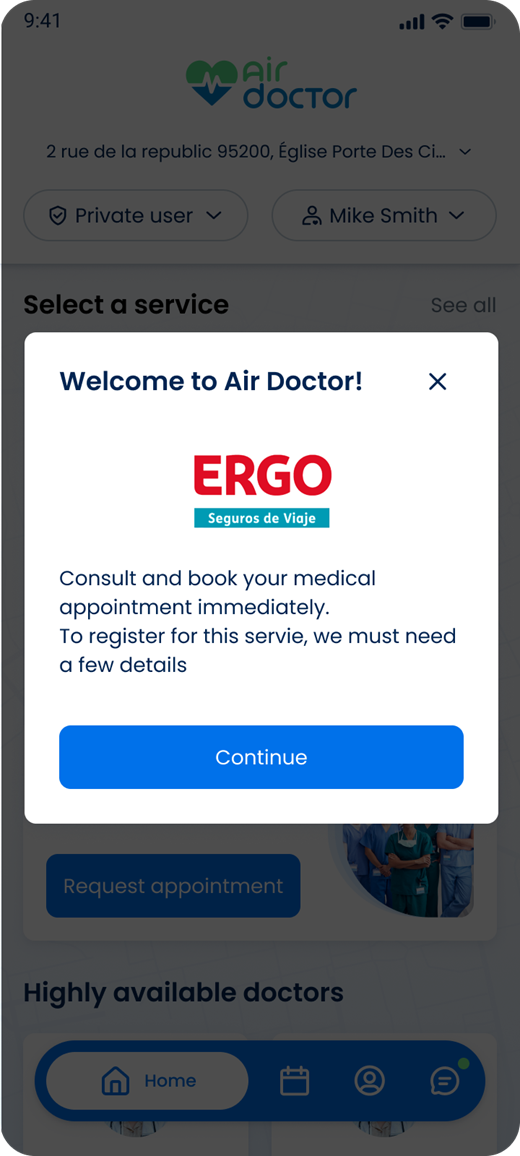
This screen includes:
| # | Element | Description |
|---|---|---|
| 1 | Modal title | Displays the welcome message |
| 2 | Close action | Dismisses the modal |
| 3 | Insurer logo | Identifies the insurance company |
| 4 | Introduction | Describes the appointment service |
| 5 | Continue button | Closes the modal and continues |
Workflow
- Open the application for the specified insurance company.
- Call
PUT /api/v3/insurers/{company-id}/greetings. - Display the insurer greeting.
- Review the welcome message.
- Select Continue to access the application.
- Select the close icon to dismiss the modal.
Search Behavior
- A brand match returns the brand and its associated insurer.
- An insurer match returns the insurer and its associated brands.
Validations
| Scenario | App behavior | SDK output |
|---|---|---|
| Company ID is missing or invalid | Block the request | error = invalid_company_id |
| Greeting content is available | Display the greeting | state = ready |
| Request fails | Display an error state | state = error |
| Session is invalid | Block access | state = unauthenticated |
Actions
| Scenario | App behavior | SDK output |
|---|---|---|
| Greeting request succeeds | Display the insurer greeting | Page object |
| Continue selected | Dismiss the modal and continue | Navigation event |
| Close selected | Dismiss the modal | Navigation event |
Endpoint Resources
Greetings
PUT
v3/insurers/{company-id}/greetings
Returns a greeting popup or page for the specified insurance company.
| Parameter | Location | Type | Required | Description |
|---|---|---|---|---|
company-id | Path | Integer | Yes | Identifies the insurance company |
Update Greetings
PATCH
v3/insurers/{company-id}/greetings
Returns a greeting popup or page for the specified insurance company.