Load Available Locations Screen
Use Load Available Locations Screen to show appointment locations.
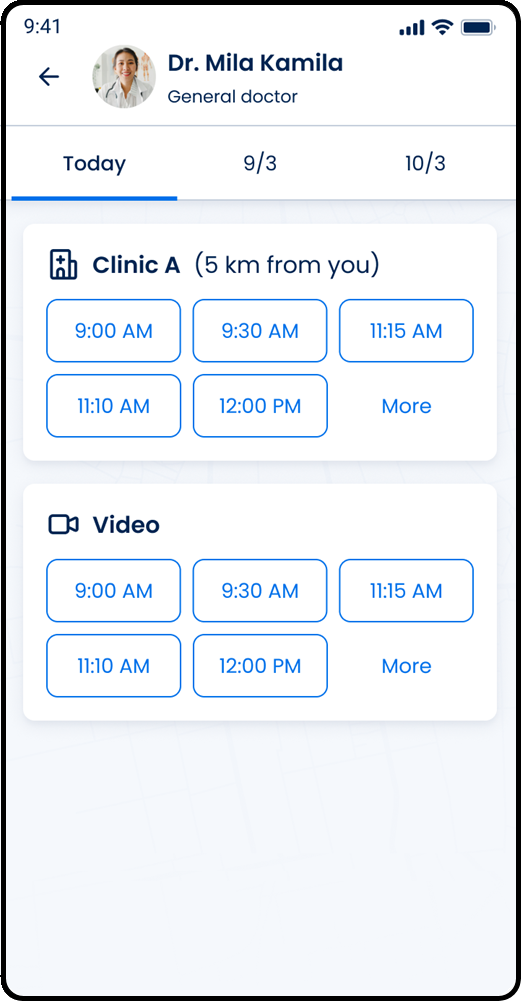
This screen includes:
| # | Element | Description |
|---|---|---|
| 1 | Header | Displays doctor image, name, specialty, and back navigation |
| 2 | Date selector | Displays available appointment dates |
| 3 | Location card | Displays an available appointment location or visit type |
| 4 | Distance indicator | Displays the distance from the patient for applicable locations |
| 5 | Time slot list | Displays available appointment times for the selected date |
| 6 | More action | Loads additional appointment times |
| 7 | Clinic availability section | Displays available appointment times for a clinic location |
| 8 | Video availability section | Displays available appointment times for video appointments |
Workflow
- Open the time and location selection flow for a selected doctor.
- Load availability for the selected doctor, date, specialty, and visit type.
- Display available locations for the selected date.
- Display available time slots for each location.
- Select a time slot.
- Continue the booking flow.
Appointment types
Appointment type indicators identify supported visit types.
- Clinic
- Home
- Video
Behavior
- Display only visit types returned for the selected doctor and date.
- Display location details for clinic and home visits when available.
- Display video availability as a separate availability section when available.
- Preserve the selected visit type when availability refreshes.
Validations
| Scenario | App Behavior | SDK Output |
|---|---|---|
profile-id missing | Block availability request | validation = required |
date missing | Block availability request | validation = required |
specialty missing | Block availability request | validation = required |
specialty unsupported | Display error state | error = invalid_specialty |
location-type unsupported | Display error state | error = invalid_location_type |
| No locations available | Display unavailable state | locations = empty |
| No time slots available | Display unavailable state | slots = empty |
| Slot unavailable | Disable slot selection | slot.enabled = false |
| Availability request succeeds | Display returned locations and time slots | status = 200 |
| Availability request fails | Display error state | status = 405 |
Actions
| Scenario | App Behavior | SDK Output |
|---|---|---|
| Screen loaded | Load available locations and time slots | PUT /api/v3/wizard/time-location-selection |
| Date selected | Reload availability for the selected date | date = updated |
| Visit type selected | Reload availability for the selected visit type | locationType = updated |
| Location selected | Set preferred location | locationId = updated |
| Time slot selected | Update selected appointment time | slot = selected |
| Back selected | Return to previous step | navigation = back |
| Continue selected | Continue booking flow | navigation = continue |
Endpoint Resources
Load Available Locations Screen
PUT
v3/profiles/{profile-id}/request
Returns available appointment dates, locations, and time slots
Hide More Locations
PATCH
v3/profiles/request/locations/less
Collapses the list of available locations.
Show More Locations
PATCH
v3/profiles/request/locations/more
Expands the list of available locations.
Show More Time Slots
PATCH
v3/profiles/request/locations/{location-id}/time-slots/more
Displays additional available time slots for the selected location.