Book Another Appointment
Use Book Another Appointment to request another appointment with the selected doctor.
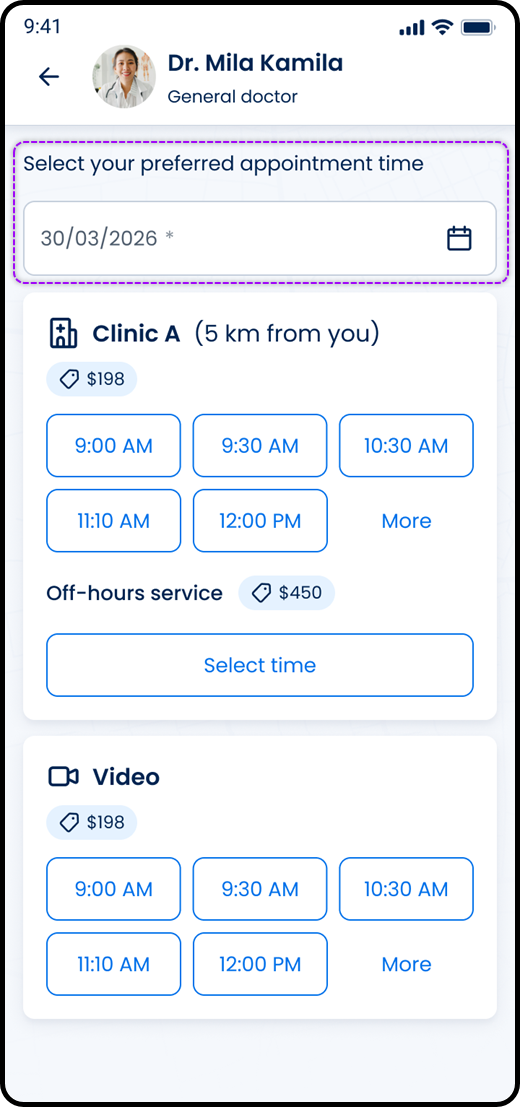
This screen includes:
| # | Element | Description |
|---|---|---|
| 1 | Doctor header | Displays the doctor photo, name, specialty, and back action. |
| 2 | Date selection section | Lets the user choose an appointment date. |
| 3 | Section title | Displays Select your preferred appointment time. |
| 4 | Date field | Accepts the appointment date. |
| 5 | Required indicator | Marks the date field as required. |
| 6 | Calendar action | Opens the date picker. |
| 7 | Appointment options | Displays available visit options after date selection. |
| 8 | Time slot options | Lets the user select an available appointment time. |
| 9 | More action | Loads additional time slots. |
| 10 | Looking for a different time action | Starts the alternative time flow. |
Workflow
- Select Looking for a different time.
- Open the book another appointment flow for the selected doctor.
- Select an appointment date.
- Load available appointment options for that date.
- Select a time slot.
- Continue the appointment request flow.
Validations
| Scenario | App behavior | SDK output |
|---|---|---|
| Date missing | Keep time selection unavailable | validation = date_required |
| Date selected | Load available appointment options | date = selected |
| No availability for selected date | Display no availability state | availability = unavailable |
| Availability found | Display visit options and time slots | availability = available |
| Time slot missing | Keep continuation blocked | validation = slot_required |
| Time slot selected | Enable continuation | slot = selected |
| Request rejected | Display error state | status = 405 |
Actions
| Scenario | App behavior | SDK output |
|---|---|---|
| Book another flow opened | Load date selection screen | PUT /api/v3/profiles/{profile-id}/request/book-another |
| Date selected | Load availability for selected date | date = selected |
| Time slot selected | Update selected appointment time | slot = selected |
| More selected | Load additional time slots | slots = more |
| Looking for a different time selected | Open alternative time flow | navigation = different_time |
| Back selected | Return to previous screen | navigation = back |
| Request rejected | Preserve current state | state = unchanged |
Endpoint Resources
Book Another
PUT
v3/profiles/{profile-id}/request/book-another
Returns the date selection screen for booking another appointment with the selected doctor.