For Edit
Use the Edit Appointment Time screen to select a new date, time, or location for an existing appointment.
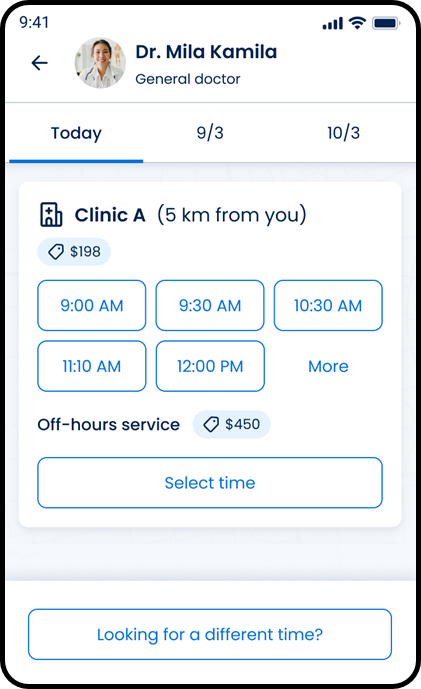
This screen includes:
| # | Element | Description |
|---|---|---|
| 1 | Header | Displays the title and navigation controls |
| 2 | Provider card | Displays provider and visit details |
| 3 | Date tabs | Displays available dates |
| 4 | Calendar action | Opens the calendar |
| 5 | Calendar | Displays available dates |
| 6 | Selected date | Identifies the current selection |
| 7 | Month navigation | Changes the displayed month |
| 8 | Clear action | Removes the selected date |
| 9 | Today action | Displays the current date |
| 10 | Time options | Displays available times |
| 11 | Location options | Displays available locations |
| 12 | Continue action | Confirms the selection |
Workflow
- Open the appointment edit flow.
- Request the time and location screen.
- Select an available date.
- Select a time and location.
- Choose Select time.
Validations
| Scenario | App behavior | SDK output |
|---|---|---|
| Appointment ID is invalid | Display an error | error = invalid_appointment_id |
| No dates are available | Display an empty state | availability = empty |
| Selected date is unavailable | Prevent selection | availability = unavailable |
| No time slots are available | Display an empty state | timeSlots = empty |
| No locations are available | Display an empty state | locations = empty |
| Required selection is missing | Disable Continue | state = incomplete |
| Request succeeds | Display the screen | status = 200 |
| Request fails | Display an error | status = 405 |
Actions
| Scenario | App behavior | SDK output |
|---|---|---|
| Screen opened | Request schedule options | PUT /api/v3/appointments/{appointment-id}/time |
| Date selected | Update the selected date | selectedDate = updated |
| Time selected | Update the selected time | selectedTime = updated |
| Location selected | Update the selected location | selectedLocation = updated |
| Clear selected | Remove the selected date | selectedDate = null |
| Continue selected | Continue the edit flow | navigation = continue |
| Back selected | Return to the previous screen | navigation = back |
Endpoint Resources
For Edit
PUT
v3/appointments/{appointment-id}/time
Returns the time and location selection screen for an existing appointment.