Off Hours for Edit
Use Off Hours for Edit to request an appointment time outside standard availability while modifying an existing appointment.
The popup displays the off-hours fee and lets the user enter a preferred appointment time.
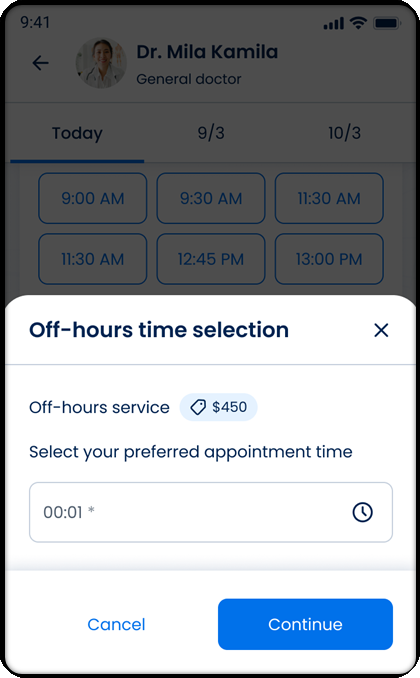
This screen includes:
| # | Element | Description |
|---|---|---|
| 1 | Off-hours modal | Lets the user enter a preferred off-hours appointment time. |
| 2 | Modal title | Displays Off-hours time selection. |
| 3 | Close action | Closes the modal. |
| 4 | Off-hours fee | Displays the additional off-hours service price. |
| 5 | Instruction text | Asks the user to select a preferred appointment time. |
| 6 | Time input field | Accepts the preferred off-hours time. |
| 7 | Time picker action | Opens the time picker. |
| 8 | Cancel action | Closes the modal without saving. |
| 9 | Continue action | Submits the selected off-hours time. |
| 10 | Background scheduling screen | Shows the doctor schedule behind the modal. |
Workflow
- Open the appointment edit flow.
- Select an appointment option that supports off-hours requests.
- Open the off-hours visit popup.
- Review the off-hours fee.
- Enter a preferred appointment time.
- Select OK.
- Submit the off-hours request.
Validations
| Scenario | App Behavior | SDK Output |
|---|---|---|
| Appointment editable | Display off-hours request flow | state = editable |
| Off-hours supported | Display off-hours popup | offHours = available |
| Time not entered | Block submission | validation = required |
| Time entered | Enable submission | validation = valid |
| Request accepted | Continue edit flow | status = success |
| Request rejected | Display error state | status = 405 |
Actions
| Scenario | App Behavior | SDK Output |
|---|---|---|
| Off-hours popup opened | Load off-hours request popup | PUT /api/v3/wizard/time-location-selection/{appointment-id}/off-hours |
| Time selected | Update preferred appointment time | time = updated |
| OK selected | Submit off-hours request | POST /api/v3/wizard/time-location-selection/{appointment-id}/off-hours/submit |
| Cancel selected | Close popup | state = cancelled |
Endpoint Resources
Off Hours for Edit
PUT
v3/appointments/{appointment-id}/time/off-hours
Returns the off-hours visit popup for an appointment edit flow
Submit Off Hours for Edit
POST
v3/appointments/{appointment-id}/time/off-hours/submit
Submits the selected off-hours time