Edit Scheduled Appointment
Use the Edit Appointment wizard to modify an existing appointment.
Editable sections, pricing, promo code support, payment requirements, and available actions derive from the wizard response.
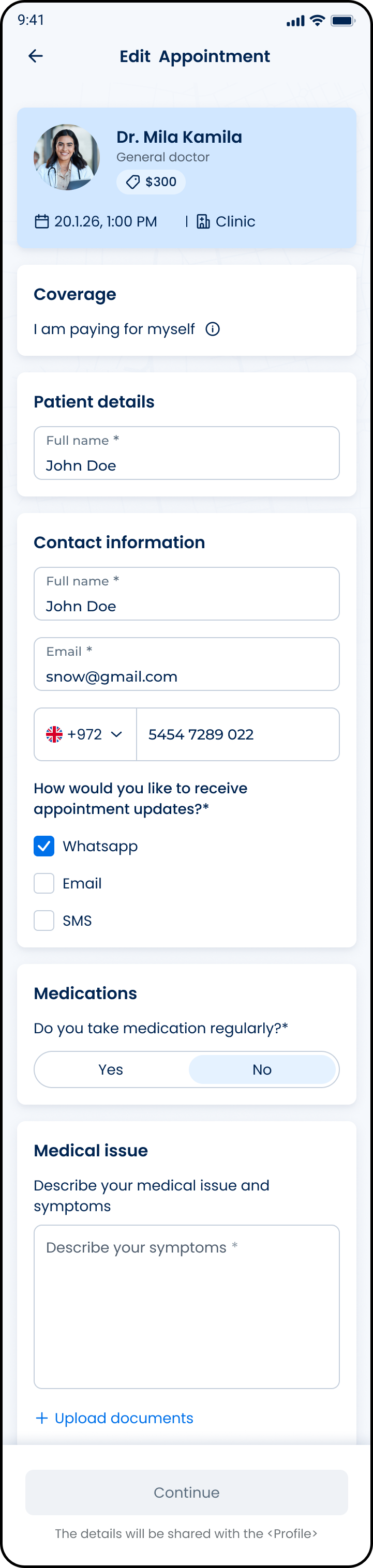
This screen includes:
| # | Element | Description |
|---|---|---|
| 1 | Header | Displays screen title and back navigation |
| 2 | Appointment summary | Displays doctor, appointment date, price, and visit type |
| 3 | Coverage section | Displays payment responsibility |
| 4 | Patient details section | Displays patient information |
| 5 | Contact information section | Updates email and phone number |
| 6 | Notification preferences | Selects appointment update channels |
| 7 | Medications section | Updates medication usage information |
| 8 | Medical issue section | Updates symptoms and medical details |
| 9 | Upload documents action | Uploads medical attachments |
| 10 | Continue action | Continues to the next wizard step |
Workflow
- Open Appointment Details.
- Select Edit appointment.
- Render editable sections from the wizard response.
- Update supported fields.
- Recalculate charges when pricing changes.
- Apply a promo code when supported.
- Continue to payment when required.
- Submit appointment changes.
- Refresh appointment details.
Validations
| Scenario | App behavior | SDK output |
|---|---|---|
| Authentication is invalid | Block access to the edit screen | state = unauthenticated |
| Appointment ID is missing | Do not submit the request | error = missing_appointment_id |
| Appointment ID is invalid | Display an appointment error | error = invalid_appointment_id |
| Appointment cannot be edited | Display the returned unavailable state | state = unavailable |
| Appointment can be edited | Display the edit screen | state = editable |
| Required response data is missing | Display an error state | error = invalid_response |
| Request is in progress | Display a loading state | state = loading |
| Request succeeds | Render the returned page | status = 200 |
| Request fails | Display the returned error | status = 405 |
Actions
| Scenario | App behavior | SDK output |
|---|---|---|
| Edit appointment selected | Request the edit screen | PUT /api/v3/appointments/{appointment-id}/edit |
| Appointment ID submitted | Add the appointment ID to the request path | appointmentId = submitted |
| Location selected | Add the location ID to the request | locationId = selected |
| Preferred date and time selected | Add the date and time to the request | dateTime = selected |
| Request submitted | Display a loading state | state = loading |
| Request succeeds | Render the returned page | status = 200 |
| Request fails | Display the returned error state | status = 405 |
| Back selected | Return to appointment details | navigation = appointment_details |
| Continue selected | Process the action defined by the returned page | action = continue |
Endpoint Resources
Wizard for Edit
PUT
v3/appointments/{appointment-id}/edit
Returns the screen to edit or reschedule an existing appointment.