Edit Coverage Disclaimer
Use Edit Coverage Disclaimer to show a confirmation message before a user changes coverage information.
The message and actions depend on the coverage action. The screenshot shows the Remove policy variant.
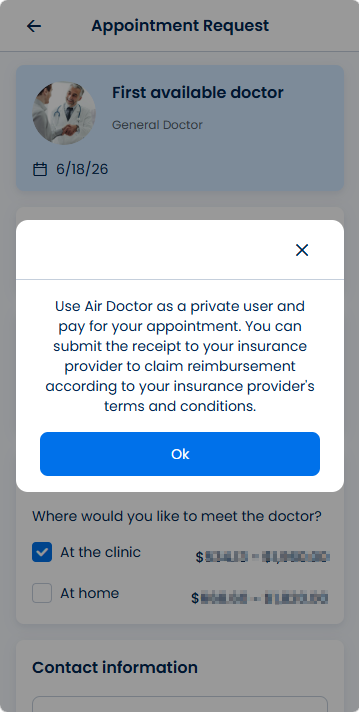
This screen includes:
| # | Element | Description |
|---|---|---|
| 1 | Modal title | Displays the coverage disclaimer title, such as Remove policy. |
| 2 | Close action | Closes the modal without a coverage change. |
| 3 | Disclaimer message | Explains the effect of the coverage action. |
| 4 | Secondary message | Provides additional context for the coverage action. |
| 5 | Primary action | Confirms the coverage action. |
| 6 | Secondary action | Cancels the coverage action and closes the modal. |
Workflow
- Open a coverage action.
- Load the coverage disclaimer modal.
- Review the disclaimer message.
- Select the primary action to continue.
- Select the secondary action or close action to cancel.
Validations
| Scenario | App Behavior | SDK Output |
|---|---|---|
| Session invalid | Block coverage action | state = unauthenticated |
| Coverage action requires disclaimer | Display disclaimer modal | disclaimer = required |
| Coverage action does not require disclaimer | Continue without modal | disclaimer = skipped |
| Coverage item unavailable | Display error state | error = coverage_unavailable |
| Disclaimer content fails to load | Display error state | state = error |
Actions
| Scenario | App Behavior | SDK Output |
|---|---|---|
| Coverage action selected | Load coverage disclaimer modal | PUT /api/v3/wizard/info/edit-coverage-disclaimer |
| Primary action selected | Continue the coverage action | coverageAction = confirmed |
| Secondary action selected | Cancel the coverage action | state = cancelled |
| Close selected | Dismiss the modal | state = dismissed |
| Request rejected | Preserve current coverage state | state = unchanged |
Endpoint Resources
Edit Coverage Disclaimer
PUT
v3/appointments/book/info/coverage-disclaimer
Returns a disclaimer popup when the patient edits insurance coverage details.