Home Screen - Side Navigation
Use the Side Navigation to access account and application destinations.
Hamburger menu
The hamburger menu layout applies only in supported WebView configurations with hamburger navigation enabled.
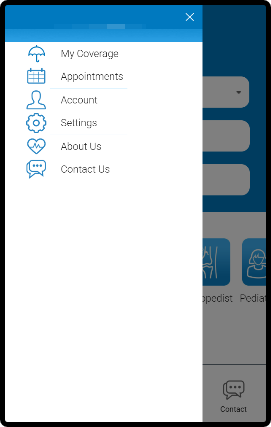
This screen includes:
| # | Element | Description |
|---|---|---|
| 1 | Overlay panel | Slides over the current screen |
| 2 | Close action | Closes the side navigation |
| 3 | Navigation list | Displays available destinations |
| 4 | My Coverage | Opens coverage details |
| 5 | Appointments | Opens appointment list |
| 6 | Account | Opens account screen |
| 7 | Settings | Opens settings |
| 8 | About Us | Opens app information |
| 9 | Contact Us | Opens support contact flow |
Workflow
- Open the side navigation (hamburger icon).
- View available destinations based on session state.
- Select a destination or close the panel.
- Navigate only after destination selection.
Validations
| Scenario | App Behavior | SDK Output |
|---|---|---|
| Mobile or supported WebView | Render side navigation | panel = available |
| Desktop without hamburger | Do not render side navigation | panel = not_available |
| User logged in | Display full navigation list | session = authenticated |
| User logged out | Display limited navigation and login entry | session = guest |
| Destination requires authentication and user is logged out | Redirect to login flow | Auth required state |
| Destination available | Enable navigation | Navigation ready |
| Destination fails to load | Display error state | Error response |
Actions
| Scenario | App Behavior | SDK Output |
|---|---|---|
| Side navigation opened | Show overlay panel and navigation list | panel = open |
| Close selected | Hide panel | panel = closed |
| Back navigation while panel is open | Close panel | panel = closed |
| Destination selected | Close panel and navigate to route | activeRoute = <destination> |
| Panel opened or closed | Keep current route unchanged | No route change |
Endpoint Resources
PUT
Patient Side Menu
/v3/home/menu
Produces the patient side menu popup.