Account Details
The Account screen shows the authenticated user’s profile, preferences, and account actions.
This screen appears only when the user has an active session.
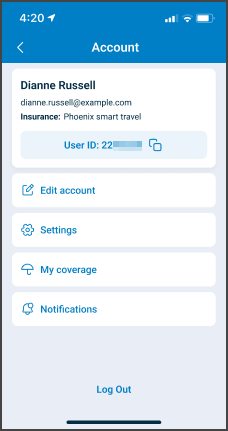
This screen includes:
| # | Element | Description |
|---|---|---|
| 1 | Profile summary | Displays user initials or profile image, full name, user ID, insurance provider, and email address |
| 2 | User ID copy action | Copies the user ID to the clipboard |
| 3 | Profile section | Provides access to Edit account, My coverage, and Notification |
| 4 | Settings section | Provides access to Languages, Currency, Distance unit, and High contrast |
| 5 | Language value | Displays the selected app language |
| 6 | Currency value | Displays the selected currency |
| 7 | Distance unit selector | Switches between Km and Mile |
| 8 | High contrast toggle | Enables or disables high-contrast display |
| 9 | About Air-doctor | Opens app information |
| 10 | Logout | Ends the active session |
| 11 | Bottom navigation | Shows Account as the active destination |
Workflow
- From the Home screen, select Account.
- Review profile details in the read-only fields.
- To change language preference, to adjust language preferences.
- To update name, language, or profile metadata, select Edit Account.
😷 Doctors only
To change availability or disable appointment intake, select Set Status.
Validations
- Blocks access without a valid session.
- Prevents changes to
User IDandEmail Address.
| Scenario | App Behavior | SDK Output |
|---|---|---|
| No authenticated session exists. | Displays the login screen or blocks access. | Returns an unauthenticated state. |
User attempts to modify read-only fields (User ID, Email Address). | Rejects changes and prevents edits. | Returns a validation error that indicates immutable fields. |
The Account screen always requires an authenticated session.
Actions
Actions vary by integration level.
| Scenario | App Behavior | SDK Output |
|---|---|---|
| Account screen loads in an authenticated state. | Display user metadata from the session context. | Returns user profile with ID, name, email, and status. |
| User selects Edit Account. | Opens the Edit Account screen. | Returns profile details for editing. |
| User selects Change Language. | Opens the Language Selection screen. | Returns current language settings. |
| User selects Set Status. | Opens availability controls and applies updates. | Returns updated status and permission information. |
| User selects Logout. | Ends the active session and displays the login screen. | Emits onLogout and clears session tokens. |
Endpoint Resources
Account Details
PUT
v3/account/details
Returns the authenticated user’s profile, including name, user ID, email address, and status fields. For users with administrative permissions, returns extended status controls.
UI Element Types
| Level | Reference | Type | Value | Placement |
|---|---|---|---|---|
| 1 | user-icon | Regular | [Abstract portrait] | ^30% |
| 1 | account-info | Group | ~70% | |
| 2 | full-name | Section | First and last name | |
| 2 | user-id | Link | User ID: user id | |
| 2 | email | Regular | ||
| 2 | status | Regular | Status | |
| 2 | set-status | Link | Set status | ~ |
| 2 | admin-status | Group | Admin doctor settings | Admin only |
| 1 | edit | Link | Edit account | |
| 1 | change-language | Link | Change language | |
| 1 | logout | Link | Logout |
Update Distance Unit
POST
v3/account/update/distance-unit
Updates the selected distance unit for the authenticated account.