Visit Summary
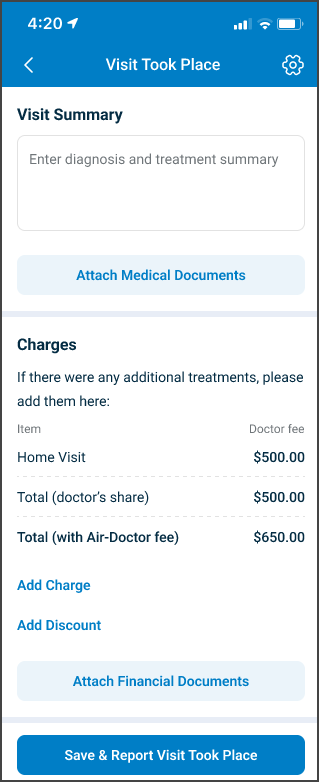
Use Visit Summary to review and submit the visit information for an appointment.
The summary includes physician notes, charges, discounts, and medical documents.
This screen includes:
| # | Element | Description |
|---|---|---|
| 1 | Appointment status message | States that the appointment is canceled due to payment failure |
| 2 | Navigation tabs | Opens Details, Charges, or Documents |
| 3 | Appointment information | Displays the doctor, date, time, visit type, distance, and specialty |
| 4 | Address notice | States when the exact clinic address becomes available |
| 5 | Patient details | Displays the patient name, date of birth, gender, and medical issues |
| 6 | Contact information | Displays the patient contact name and email address |
Workflow
- Call
PUT /api/v3/appointments/{appointment-id}/summary. - Render the returned visit summary page.
- Apply updates to the summary fields and related items.
- Call
POST /api/v3/appointments/{appointment-id}/summary. - Treat
204 No Contentas a successful submission.
Validations
| Scenario | App behavior | SDK output |
|---|---|---|
| Summary page request succeeds | Display the visit summary | Page object |
| Required summary value is invalid | Block submission and identify the affected field | Validation response |
| Summary contains valid values | Allow submission | Valid page state |
| Submission succeeds | Complete the visit summary action | HTTP 204 |
| Submission fails | Display the applicable error | Error response |
Actions
| Scenario | App behavior | SDK output |
|---|---|---|
| Visit Summary opens | Load the summary page | PUT /api/v3/appointments/{appointment-id}/summary |
| Summary value changes | Update the active summary state | Page update |
| Charge changes | Apply the charge update to the summary | Update set |
| Discount changes | Apply the discount update to the summary | Update set |
| Document changes | Apply the document update to the summary | Update set |
| Submit selected | Submit the complete visit summary | POST /api/v3/appointments/{appointment-id}/summary |
| Submission succeeds | Complete the summary submission | HTTP 204 |
Endpoint Resources
Visit Summary
PUT
v3/appointments/{appointment-id}/summary
Displays the visit summary screen for the specified appointment.
I would clean the table so the Value column explains the SDK element value rather than implementation details such as “JSON representation,” and keep repeated/indexed elements clear.
UI Element Types
| Level | Reference | Type | Value | Placement |
|---|---|---|---|---|
| 1 | summary-header | Section | Visit summary | — |
| 1 | internal-note | Memo | Diagnosis and treatment summary | 1 |
| 1 | summary-group~0 | Group | Visit summary entry | 1 |
| 2 | summary-field-name~0 | Regular | Summary field name | — |
| 2 | summary-name-spacer~0 | Spacer | — | ~ |
| 2 | summary-edit-button~0 | Link | Edit | ~ |
| 2 | summary-files~0 | Upload | Visit summary file | — |
| 2 | summary-notes~0 | Edit | Summary notes | 1 |
| 1 | summary-target | Regular | Summary insertion target | 1 |
| 1 | attach-summary-text | Regular | Or upload visit summary: | — |
| 1 | upload-visit-summary | Secondary | Upload Visit Summary | — |
| 1 | bar | Bar | — | — |
| 1 | charges-header | Section | Charges | 1 |
| 1 | charges-info | Regular | If there were any additional treatments, please add them here: | — |
| 1 | header-item | Extra | Item | — |
| 1 | header-spacer | Spacer | — | ~ |
| 1 | header-amount | Extra | Doctor fee | ~ |
| 1 | visit-type | Regular | Appointment visit type | 1 |
| 1 | visit-spacer | Spacer | — | ~ |
| 1 | visit-fee | Highlight | Appointment net fee in the appointment currency | ~ |
| 1 | dashes | Dashes | — | — |
| 1 | charge-group~0 | Group | Charge entry | — |
| 2 | extra-title~0 | Regular | Charge description | — |
| 2 | extra-spacer~0 | Spacer | — | 1 |
| 2 | extra-amount~0 | Highlight | Quantity × price in the appointment currency | ~ |
| 2 | extra-edit~0 | Link | Edit | ~ |
| 2 | charge-info~0 | Edit | Charge description | 1 |
| 2 | charge-quantity~0 | Integer | Charge quantity | 1 |
| 2 | charge-price~0 | Double | Price per item | 1 |
| 2 | dashes~0 | Dashes | — | — |
| 1 | extra-target | Regular | Charge insertion target | 1 |
| 1 | discount-group | Group | Discount entry | 1 |
| 2 | extra-title~d | Regular | Discount description | 1 |
| 2 | extra-spacer~d | Spacer | — | ~ |
| 2 | extra-amount~d | Highlight | Discount amount in the appointment currency | 1 |
| 2 | extra-edit~d | Link | Edit | ~ |
| 2 | discount-type~d | Edit | Discount type | 1 |
| 2 | discount-amount~d | Double | Discount amount or percentage | 1 |
| 2 | dashes | Dashes | — | — |
| 1 | discount-target | Regular | Discount insertion target | 1 |
| 1 | total-fee-title | Highlight | Total (doctor’s share) | — |
| 1 | total-fee-spacer | Spacer | — | ~ |
| 1 | total-fee | Highlight | Appointment net fee + charges − discount | ~ |
| 1 | add-charge | Ghost | Add charge | 1 |
| 1 | add-discount | Ghost | Add discount | 1 |
| 1 | bar | Bar | — | — |
| 1 | document-header | Section | Documents | — |
| 1 | document-group~0 | Group | Medical document entry | — |
| 2 | document-type-title~0 | Highlight | Medical document type | 1 |
| 2 | document-file-name~0 | Extra | Document name | — |
| 2 | document-name-spacer~0 | Spacer | — | ~ |
| 2 | document-edit-button~0 | Link | Edit | ~ |
| 2 | document-files~0 | Upload | Medical document file | — |
| 2 | document-type~0 | Edit | Medical document type | 1 |
| 2 | document-notes~0 | Edit | Document notes | 1 |
| 1 | document-target | Regular | Document insertion target | 1 |
| 1 | attach-medical-document | Secondary | Attach Documents | — |
| 1 | bar | Bar | — | — |
| 1 | save | Button | Save & Report Visit Took Place | — |
Save Visit Summary
POST
v3/appointments/{appointment-id}/summary
Saves the complete visit summary, including charges, discounts, and medical documents, for the specified appointment.
Saves the complete visit summary for the appointment. This operation records physician notes, charges, discounts, and medical documents. The endpoint enforces validation rules and business constraints. A successful request returns 204 No Content.