Show Video Doctor
Use Show Video Doctor to display the video service option from the Doctor List edit search flow.
This screen opens from Edit Search and lets the user select Video as the active service criteria.
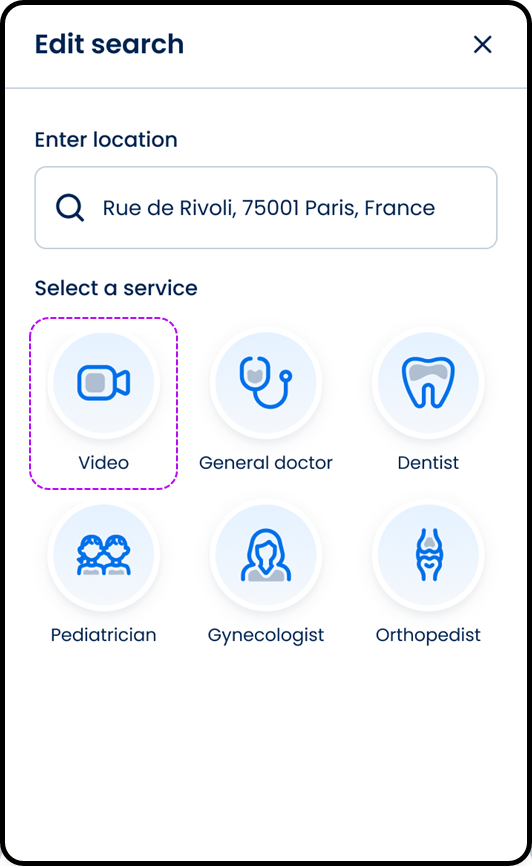
This screen includes:
| # | Element | Description |
|---|---|---|
| 1 | Header | Displays the Edit search title |
| 2 | Close action | Dismisses the screen |
| 3 | Location section | Displays the search location |
| 4 | Location input | Updates the search location |
| 5 | Service selection section | Displays available services |
| 6 | Service option | Selects a service for the search |
Workflow
- Open Edit Search from the Doctor List.
- Select the video service option.
- Update the active search criteria.
- Return updated results to the Doctor List.
Validations
| Scenario | App Behavior | SDK Output |
|---|---|---|
| Video option selected | Open service selection popup | state = service_selection_open |
| Available video services returned | Display General doctor, Pediatrician, and Orthopedist options | videoOptions = available |
| No video services returned | Display empty service state | videoOptions = empty |
| Service option missing | Keep current service selection | validation = service_required |
Actions
| Scenario | App Behavior | SDK Output |
|---|---|---|
| Video option opened | Display service selection popup | PUT /api/v3/doctors/edit-search/video-options |
| General doctor selected | Set video service to General doctor | service = general |
| Pediatrician selected | Set video service to Pediatrician | service = pediatrician |
| Orthopedist selected | Set video service to Orthopedist | service = orthopedist |
| Popup close selected | Dismiss service selection popup | navigation = dismiss |
Endpoint Resources
Show Video Doctor
PUT
v3/profiles/edit-search/video-options
Opens a video doctor popup with specialties available for the specified location.
Save Searching
POST
v3/profiles/edit-search
Saves the selected search criteria and redirects to the doctor list.