Appointment Scheduled
Use Appointment Scheduled to confirm that the selected alternative appointment is scheduled.
The modal displays the doctor, appointment date and time, location, and applicable price information.
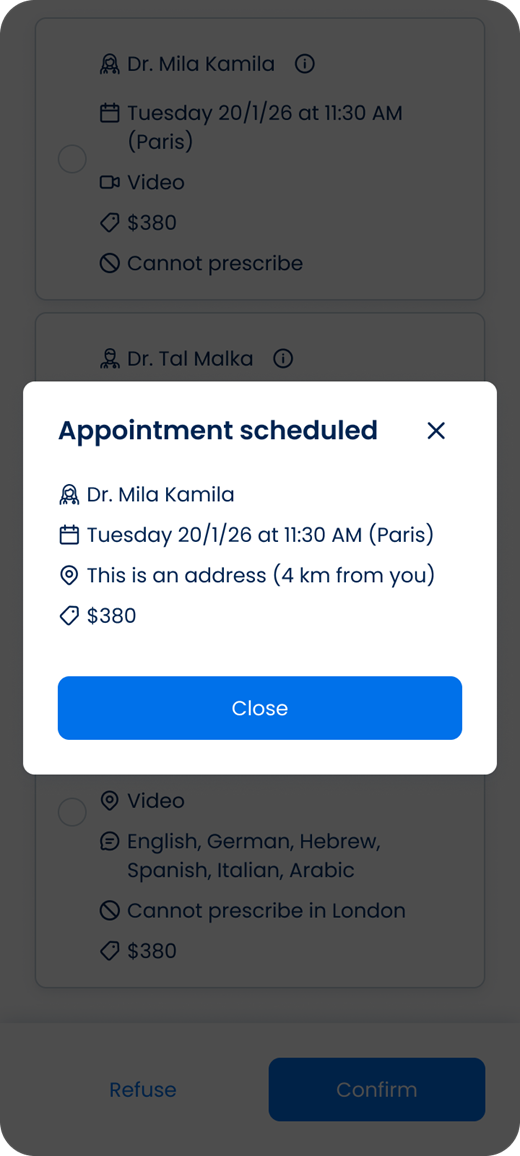
This screen includes:
| # | Element | Description |
|---|---|---|
| 1 | Confirmation message | States that the appointment is scheduled |
| 2 | Doctor details | Displays the doctor for the scheduled appointment |
| 3 | Date and time | Displays the scheduled appointment date, time, and time zone |
| 4 | Location | Displays the appointment location and distance when available |
| 5 | Price | Displays the applicable appointment price |
| 6 | Discount | Displays the original price, discounted price, and discount amount when applicable |
| 7 | Close action | Closes the confirmation modal |
| 8 | Close icon | Closes the confirmation modal |
Workflow
- Select an alternative appointment.
- Confirm the selected alternative in the Alternative Appointment Offers flow.
- Complete the appointment approval request.
- Call
PUT /api/v3/appointments/{appointment-id}/approve/success. - Display the Appointment Scheduled modal.
- Review the scheduled appointment details.
- Select Close or the close icon to dismiss the modal.
Validations
| Scenario | App behavior | SDK output |
|---|---|---|
| Appointment approval succeeds | Display the Appointment Scheduled modal | Page object |
| Scheduled appointment details are available | Display the applicable appointment information | Page object |
| Discount applies | Display the original price, final price, and discount amount | Page object |
| No discount applies | Display the applicable appointment price | Page object |
Request returns 200 | Render the returned success page | Page object |
Request returns 405 | Display an application error | Error response |
| Session is invalid | Reject the request | Authentication error |
Actions
| Scenario | App behavior | SDK output |
|---|---|---|
| Success screen opens | Display the scheduled appointment details | PUT /api/v3/appointments/{appointment-id}/approve/success |
| Close selected | Dismiss the confirmation modal | Close action |
| Close icon selected | Dismiss the confirmation modal | Close action |
Endpoint Resources
Appointment Scheduled
PUT
v3/appointments/{appointment-id}/approve/success
Returns the success page after an alternative appointment offer is approved.