Controlled Substances Rxs
Use Controlled Substances to display prescription restrictions for video appointment requests. The warning explains that controlled substances cannot be prescribed in video appointments.
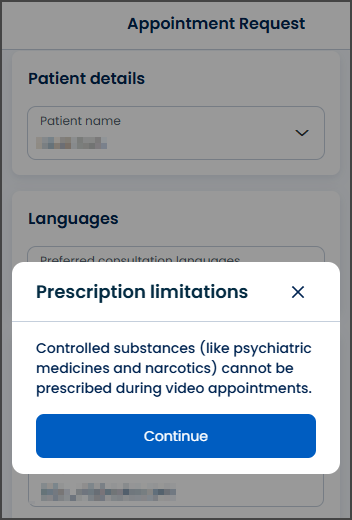
This screen includes:
| # | Element | Description |
|---|---|---|
| 1 | Modal title | Displays Prescription limitations. |
| 2 | Close action | Dismisses the modal. |
| 3 | Warning message | Explains that controlled substances cannot be prescribed during video appointments. |
| 4 | Continue action | Confirms the warning and continues the appointment request flow. |
Workflow
- Start or continue an appointment request.
- Check prescription restrictions for the appointment type.
- Display the Prescription limitations modal when the restriction applies.
- Select Continue to proceed.
- Select the close action to dismiss the modal and preserve the current request state.
Validations
| Scenario | App Behavior | SDK Output |
|---|---|---|
| Prescription restriction applies | Display prescription limitation modal | warning = controlled_substances |
| Warning confirmed | Continue appointment request flow | state = confirmed |
| Warning dismissed | Preserve current appointment request state | state = unchanged |
| Warning content fails to load | Display error state | state = error |
Actions
| Scenario | App Behavior | SDK Output |
|---|---|---|
| Warning required | Load prescription limitation modal | PUT /api/v3/wizard/info/controlled-substances-prescription |
| Continue selected | Continue appointment request flow | state = continued |
| Close selected | Dismiss prescription limitation modal | state = unchanged |
| Request rejected | Preserve current appointment request state | state = error |
Endpoint Resources
Controlled Substances Prescription
PUT
v3/appointments/book/warning/controlled-substances-prescription
Returns a popup that informs the patient about prescription limits for controlled substances.