Book a Direct Clinic Appointment
Use the Direct Clinic Appointment Request screen to create a clinic appointment request with a selected provider and clinic location.
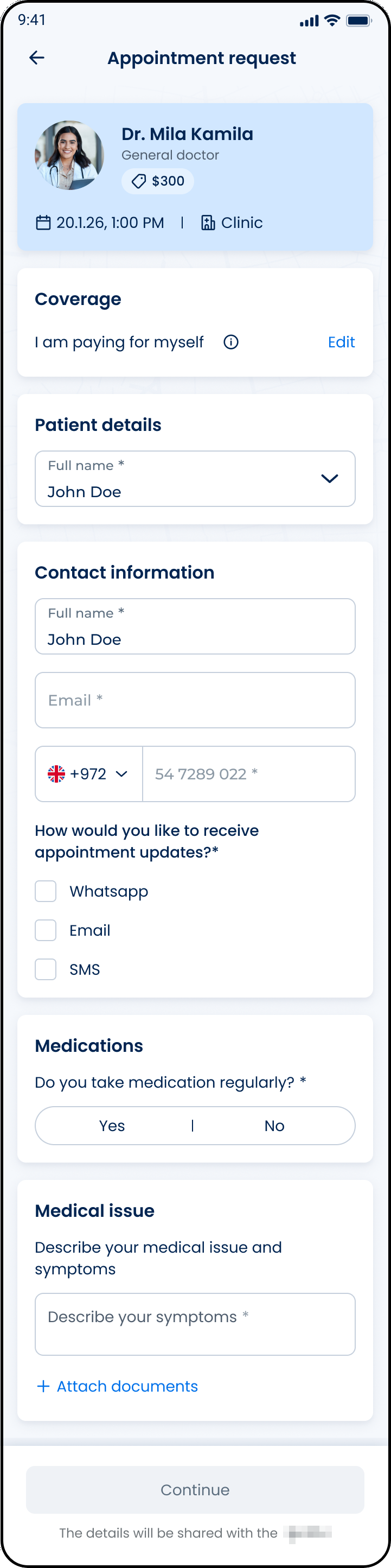
This screen includes:
| # | Element | Description |
|---|---|---|
| 1 | Header | Displays the Appointment request title and back action |
| 2 | Provider card | Displays provider name, specialty, appointment date, time, visit type, distance, and clinic note |
| 3 | Coverage section | Displays the selected coverage or payment option |
| 4 | Patient details section | Displays the selected patient profile |
| 5 | Contact information section | Collects contact name, email, phone number, and preferred contact methods |
| 6 | Medications section | Captures whether the patient takes medications on a regular basis |
| 7 | Medical issue section | Collects the medical problem description |
| 8 | Attachment action | Adds supporting documents |
| 9 | Primary action | Continues to the next appointment request step |
| 10 | Data-sharing notice | Explains that details are shared with the doctor |
Workflow
- Select a doctor > Clinic location.
- Open the Direct Clinic Appointment Request screen.
- Review provider and appointment details.
- Select coverage and patient information.
- Enter required contact information.
- Complete medical information.
- Select Next.
Validations
| Scenario | App Behavior | SDK Output |
|---|---|---|
| Provider missing | Block screen load | error = profile_required |
| Location missing | Block screen load | error = location_required |
| Specialty missing | Block screen load | error = specialty_required |
| Patient missing | Disable Next | validation = patient_required |
| Contact name missing | Disable Next | validation = contact_name_required |
| Email missing or invalid | Display field validation | error = invalid_email |
| Phone number missing or invalid | Display field validation | error = invalid_phone |
| Contact method missing | Disable Next | validation = contact_method_required |
| Medical issue missing | Disable Next | validation = medical_issue_required |
| Required fields complete | Enable Next | state = ready |
| Request rejected | Display error state | status = 405 |
Actions
| Scenario | App Behavior | SDK Output |
|---|---|---|
| Screen opens | Load clinic appointment request form | PUT /api/v3/wizard/direct-clinic |
| Coverage selected | Update coverage context | coverage = selected |
| Patient selected | Update patient context | patient = selected |
| Contact details entered | Update contact state | contact = updated |
| Contact method selected | Update contact preference | contactPreference = updated |
| Medication option selected | Update medication state | medications = updated |
| Medical issue entered | Update request details | medicalIssue = updated |
| Attachment selected | Add supporting document | attachment = added |
| Next selected | Continue appointment request flow | navigation = next |
| Back selected | Return to previous screen | navigation = back |
Endpoint Resources
Wizard for Direct Clinic
PUT
v3/appointments/book/direct-clinic
Returns the screen for booking a direct clinic appointment with the selected provider and location.
Appointment Workflow
| Method | Endpoint | Purpose |
|---|---|---|
| PUT | v3/appointments/book | Returns the regular appointment wizard for the selected provider, location, and date. |
| PATCH | v3/appointments/book/steps/next | Saves the current step and opens the next wizard step. |
| PATCH | v3/appointments/book/steps/previous | Opens the previous wizard step. |
| PATCH | v3/appointments/book/checkout | Updates the checkout state for the current appointment flow. |
| POST | v3/appointments/book/create | Creates an appointment from the current wizard data. |
| POST | v3/appointments/book/update | Updates an existing appointment from the revised booking data. |
Promo Code
| Method | Endpoint | Purpose |
|---|---|---|
| PATCH | v3/appointments/book/promo/accessibility | Sets promo code action availability for the entered value. |
| PATCH | v3/appointments/book/promo/apply | Applies a promo code and updates the appointment price or eligibility. |
| PATCH | v3/appointments/book/promo/delete | Removes the promo code and refreshes the appointment price. |
Appointment Options
| Method | Endpoint | Purpose |
|---|---|---|
| PATCH | v3/appointments/book/sms/availability | Checks SMS availability and sets SMS consent visibility. |
| PATCH | v3/appointments/book/update/agreement | Updates the consent section from the agreement status. |
| PATCH | v3/appointments/book/update/home | Updates the appointment location options from the selected visit type. |
| PATCH | v3/appointments/book/update/interpreter | Updates interpreter preferences for the consultation. |
| PATCH | v3/appointments/book/update/preferences | Updates preferred languages for the video consultation. |
| PATCH | v3/appointments/book/update/medications | Updates the medication section from the selected medication status. |