Appointment Verification
Use the Appointment Verification popup to inform the user that an appointment request was submitted and is awaiting clinic approval. This popup may display when the clinic is unavailable to process requests immediately and can present alternative consultation options.
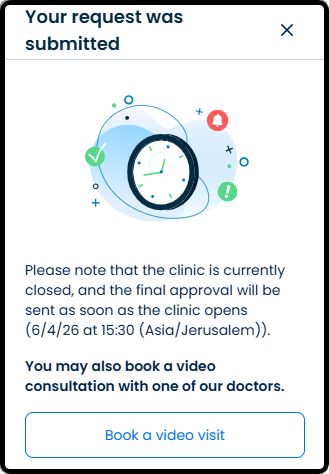
This screen includes:
| # | Element | Description |
|---|---|---|
| 1 | Title | Displays request submission confirmation |
| 2 | Close action | Dismisses the popup |
| 3 | Status illustration | Indicates that the appointment request is pending clinic review |
| 4 | Verification message | Explains that final approval is pending and displays the expected response time |
| 5 | Alternative consultation message | Informs the user that a video consultation remains available |
| 6 | Book a video visit action | Opens the video consultation booking flow |
| 7 | Modal container | Displays appointment verification information and blocks interaction with the underlying screen |
Workflow
- Submit an clinic appointment request.
- Open the Appointment Verification popup.
- Review the approval information.
- Select Book a video visit or dismiss the popup.
- Continue the appointment flow.
Validations
| Scenario | App Behavior | SDK Output |
|---|---|---|
| Appointment request submitted | Display verification popup | status = 200 |
| Clinic approval pending | Display expected response time | state = pending_approval |
| Video consultation available | Display alternative booking action | videoVisit = available |
| Popup request fails | Display error state | status = 405 |
| User not authorized | Block popup access | error = unauthorized |
Actions
| Scenario | App Behavior | SDK Output |
|---|---|---|
| Popup opens | Display appointment verification information | PUT /api/v3/direct-clinic/appointment/info |
| Book a video visit selected | Open video consultation booking flow | navigation = video_visit |
| Close selected | Dismiss popup | navigation = dismiss |
| Approval information displayed | Update verification state | state = pending_approval |
Endpoint Resources
Appointment Verification Popup
PUT
v3/direct-clinic/appointment/info
Returns an informational popup indicating that the appointment is being verified