Appointment Already Scheduled
Use the Appointment Already Scheduled popup to inform the user that the selected patient already has an appointment with the selected specialty.
This popup prevents duplicate appointment requests for the same patient and specialty.
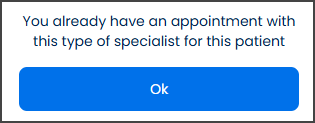
This screen includes:
| # | Element | Description |
|---|---|---|
| 1 | Status message | Informs the user that the selected patient already has an appointment with the selected specialty |
| 2 | OK action | Dismisses the popup |
| 3 | Modal container | Displays scheduling information and blocks interaction with the underlying screen |
Workflow
- Start a direct clinic appointment request.
- Select a patient and specialty.
- Detect an existing scheduled appointment.
- Open the Appointment Already Scheduled popup.
- Select OK.
- Return to the previous flow.
Validations
| Scenario | App Behavior | SDK Output |
|---|---|---|
| Existing appointment detected | Display warning popup | status = 200 |
| Patient already has appointment for the selected specialty | Block duplicate booking flow | state = appointment_exists |
| Popup request fails | Display error state | status = 405 |
| User not authorized | Block popup access | error = unauthorized |
Actions
| Scenario | App Behavior | SDK Output |
|---|---|---|
| Popup opens | Display appointment warning | PUT /api/v3/direct-clinic/error |
| Existing appointment detected | Prevent duplicate scheduling | state = appointment_exists |
| OK selected | Dismiss popup | navigation = dismiss |
| Popup dismissed | Return to previous screen | navigation = back |
Endpoint Resources
Patient Already has a Scheduled Appointment
PUT
v3/direct-clinic/error
Returns a warning popup when the patient already has a scheduled appointment with the selected provider and location.