Sign in
Use the Sign in screen to authenticate a user and create an active session. This screen also presents MFA when the account requires extra verification.
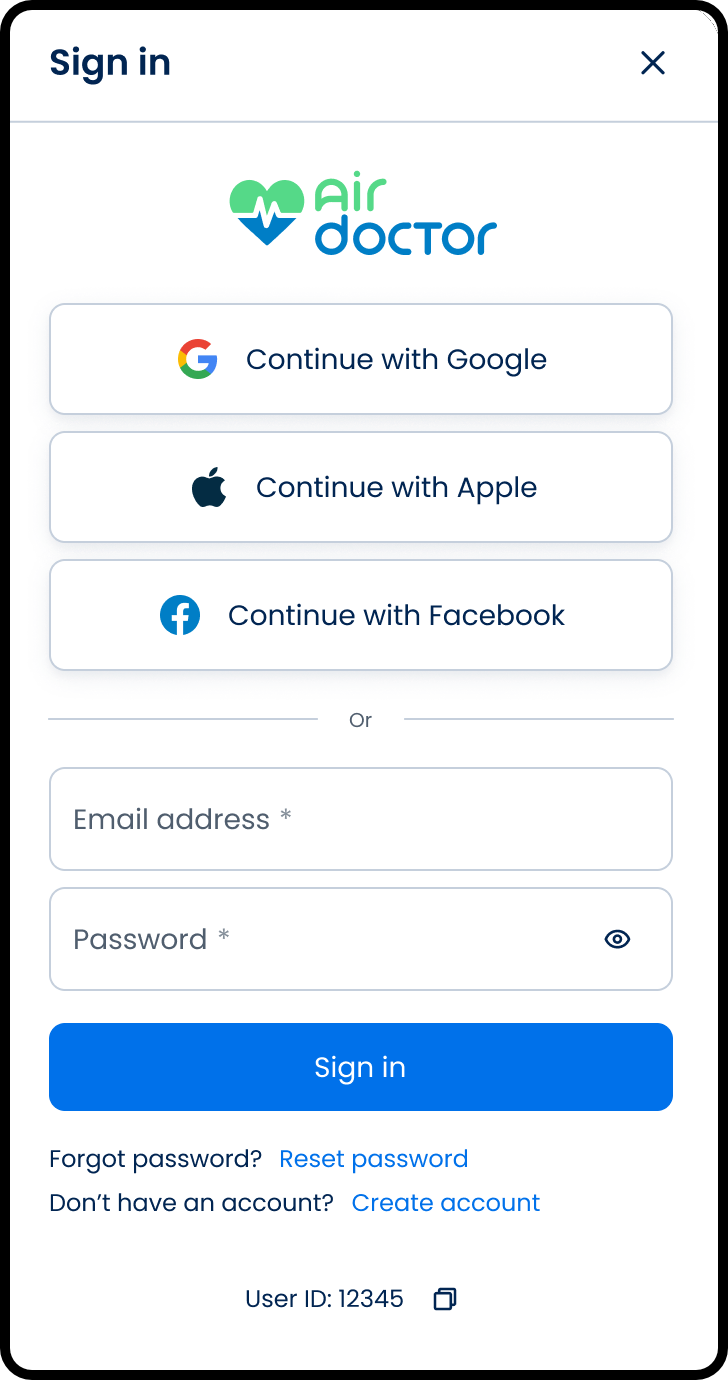
This screen includes:
| # | Element | Description |
|---|---|---|
| 1 | Header | Displays Sign in title and close control |
| 2 | Branding | Displays Air Doctor logo |
| 3 | Social sign-in options | Provides Google, Apple, and Facebook authentication |
| 4 | Email field | Required input for account email |
| 5 | Password field | Required input with visibility toggle |
| 6 | Sign in button | Submits credentials |
| 7 | Forgot password link | Opens the reset password flow |
| 8 | Create account link | Opens account registration |
| 9 | User ID label | Displays user identifier with copy action |
Workflow
- Open the Sign in screen.
- Select a social sign-in option or enter email and password.
- Select Sign in.
- Complete MFA when required.
- Access the application.
Validations
| Scenario | App behavior | SDK output |
|---|---|---|
| Email or password missing | Disable submission or show field error | validation = required |
| Email format invalid | Display inline error | error = invalid_email |
| Credentials invalid | Display generic authentication error | error = invalid_credentials |
| MFA required | Display verification code field | state = mfa_required |
| MFA code invalid | Display verification error | error = invalid_mfa |
| Request in progress | Show loading state | state = loading |
| Network failure | Display error state | error = network |
Actions
| Scenario | App behavior | SDK output |
|---|---|---|
| Email entered | Update input state | email = updated |
| Password entered | Update input state | password = updated |
| Password visibility selected | Toggle password visibility | passwordVisible = true/false |
| Sign in selected | Submit credentials | Sign-in request triggered |
| Social sign-in selected | Start provider authentication | Social authentication event |
| MFA code submitted | Verify code | MFA request triggered |
| Authentication succeeds | Create session and continue | state = authenticated |
| Forgot password selected | Open reset password flow | Navigation event |
| Create account selected | Open registration flow | Navigation event |
| Close selected | Dismiss sign-in screen | Navigation event |
Endpoint Resources
Sign In
PUT
v3/sign-in
This endpoint returns the sign-in screen for anonymous users.
Query Parameters
| Name | Type | Required | Description |
|---|---|---|---|
screen-mode | string | Yes | Controls which sign-in experience to render (regular, wizard, direct clinic, affiliate, partner). |
MFA
PUT
v3/sign-in/mfa
This endpoint returns the MFA verification screen for completing sign-in.
Sign In
POST
v3/sign-in
This endpoint authenticates a user with email and password.
Query Parameters
| Name | Type | Required | Description |
|---|---|---|---|
screen-mode | string | Yes | Controls which sign-in experience to render (regular, wizard, direct clinic, affiliate, partner). |
email | string | Yes | Account email address used for authentication. |
password | string | Yes | Account password used for authentication. |
Sign In With MFA
POST
v3/sign-in/mfa
This endpoint authenticates a user with email and password and verifies the MFA one-time code.
Query Parameters
| Name | Type | Required | Description |
|---|---|---|---|
screen-mode | string | Yes | Controls which sign-in experience to render (regular, wizard, direct clinic, affiliate, partner). |
email | string | Yes | Account email address used for authentication. |
password | string | Yes | Account password used for authentication. |
mfa | string | Yes | One-time code from an authenticator app. Required when MFA is enabled. |
Social Sign In
POST
v3/sign-in/social
This endpoint authenticates a user using a social identity token.
Query Parameters
| Name | Type | Required | Description |
|---|---|---|---|
screen-mode | string | Yes | Controls which sign-in experience to render (regular, wizard, direct clinic, affiliate, partner). |
token | string | Yes | Firebase identity token from the social provider used to authenticate the user. |