Forgot Password Entry Point
Use the Forgot password link to start the password recovery flow from the Sign In screen.
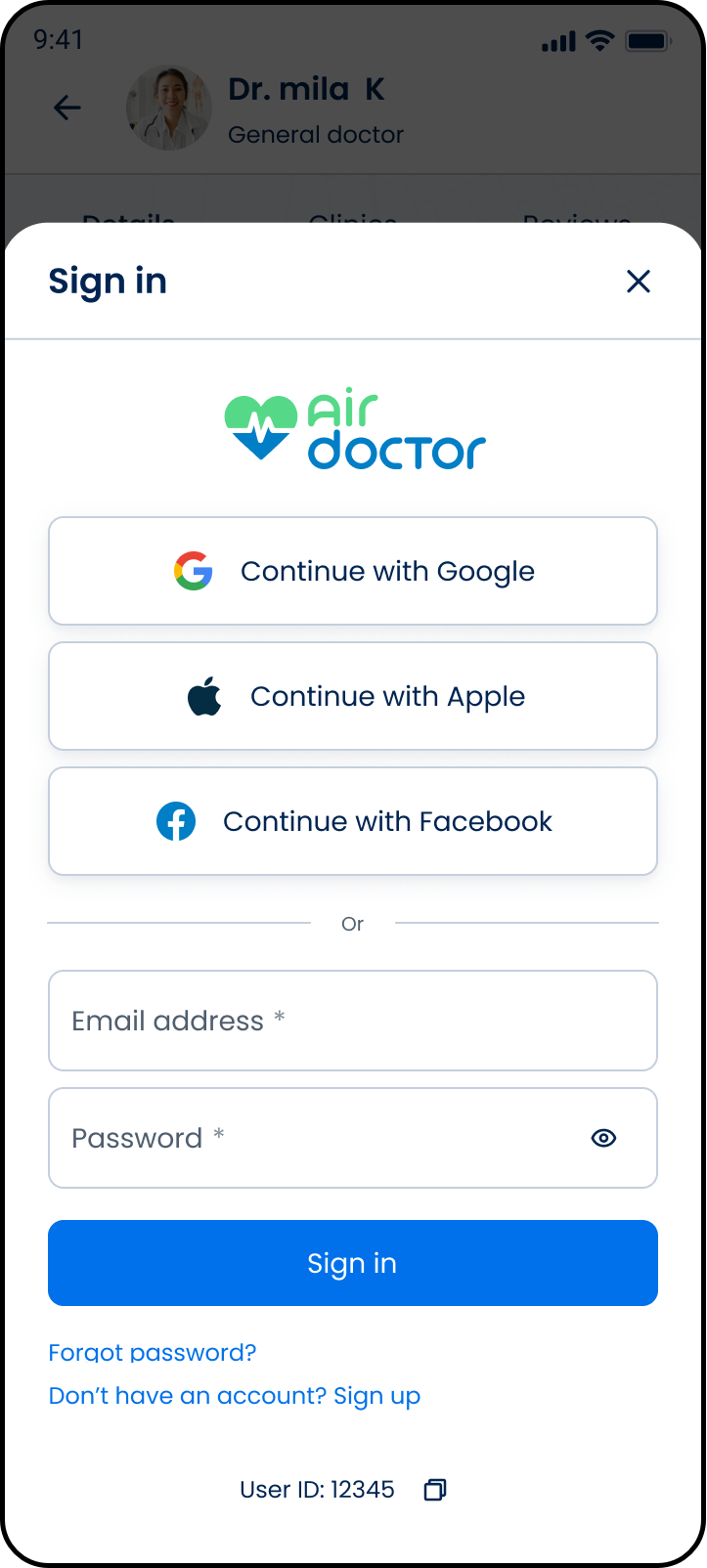
This screen includes:
| # | Element | Description |
|---|---|---|
| 🔴 | Forgot password link | Text link displayed below the Sign in button |
| - | Inline placement | Appears within the Sign In modal |
| - | Secondary navigation | Does not interrupt current input until selected |
Visibility rule
The Forgot password option is conditionally rendered based on email input validation..
Workflow
- Open the Sign In screen.
- Enter an email address.
- When the email input passes format validation, display Forgot password.
- Select Forgot password.
- Navigate to the Reset Password Request screen.
Validations
| Scenario | App behavior | SDK output |
|---|---|---|
| Email input empty or invalid | Hide Forgot password option | forgotPassword = hidden |
| Email input passes format validation | Display Forgot password option | forgotPassword = visible |
Actions
| Scenario | App behavior | SDK output |
|---|---|---|
| Forgot password selected | Navigate to reset flow | Navigation event |
| Email input updated | Re-evaluate visibility of option | forgotPassword = visible/hidden |