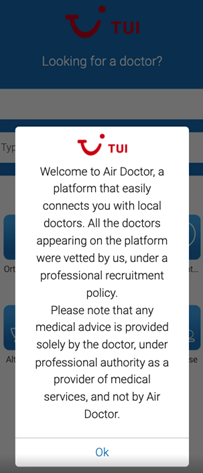
Affiliate Greeting


The Affiliate greeting pop-up appears when a user opens the service through a partner referral link. The pop-up introduces the service and indicates that the user accesses the platform through a partner organization.

This screen provides the first onboarding step for users who access the service through a partner. After the greeting closes, the onboarding flow continues with registration and coverage setup.

Content, branding elements, and available actions vary based on partner configuration and platform context (mobile web, desktop web, or native application).

This screen includes:

  • Welcome modal - returned by the server as a UI page definition. The modal appears above the main application interface and blocks interaction with background elements.
  • Title - Displays Welcome to Air Doctor!.
  • Partner branding block - Displays the World Travel Protection logo and partner name when the integration runs under a partner configuration.
  • Service description - Text that explains the purpose of the service and indicates that registration requires a small set of user details.
  • Continue action - Continue button that triggers the next step in the onboarding or registration workflow.
  • Close control - X icon that dismisses the modal and returns the user to the previous application state.
  • Application background - The underlying application UI remains visible but inactive while the modal is displayed. The background includes the top navigation and bottom navigation components provided by the host application.

Workflow

  1. The user opens the service through a partner referral link.
  2. The application loads the login or onboarding screen.
  3. The app displays the Affiliate greeting pop-up above the page.
  4. The pop-up displays partner branding, greeting text, and a primary action.
  5. The user does one of the following actions:
    • Select Continue to proceed with onboarding.
    • Close the pop-up.
  6. The app continues to Log in.

Post-Workflow Behavior

  • The greeting pop-up displays one time for the referral session.
  • On mobile web, a new user continues in the browser after the greeting closes.
  • On desktop web, a new user continues in the browser after the greeting closes.
  • If an existing user has the native app installed and opens a new partner link, the session continues in the native app context.
  • If an existing user opens a new partner link in the web app, the session continues in the web app context.
  • Any other launch dialog displays only after the greeting pop-up closes.

Validations

ScenarioApp behaviorSDK output
User opens the service through a partner referral link.The greeting pop-up displays.Page model with greeting pop-up.
User does not open the service through a partner referral link.The greeting pop-up does not display.No greeting pop-up in the page model.
Greeting pop-up already displayed for the session.The pop-up does not display again.No greeting pop-up returned.
Other launch dialogs exist.The greeting pop-up displays first.Greeting pop-up returned before other dialogs.
Title value exists.The title displays.Page model with title.
Title value does not exist.The title remains hidden.Page model without title.
Body text value exists.The body text displays.Page model with body text.
Body text value does not exist.The body text remains hidden.Page model without body text.
Partner image exists.The partner image displays.Page model with partner image.
Partner image does not exist.A default image displays.Page model with default image.
Platform is mobile web, desktop web, or native app.Layout adjusts to the platform.Page model formatted for the platform.

Actions

ScenarioApp behaviorSDK output
Open service through partner referral link.The greeting pop-up displays.Page model with greeting pop-up.
Select Continue.The pop-up closes and onboarding continues.Update set with next onboarding step.
Select Close (X).The pop-up closes.Update set dismissing the pop-up.
Click outside the pop-up.The pop-up closes.Update set dismissing the pop-up.
Press Escape.The pop-up closes.Update set dismissing the pop-up.
Use Back, Menu, or Logo.The pop-up closes.Update set dismissing the pop-up.
New user continues on mobile web.Onboarding continues in the browser.Update set loading web onboarding flow.
New user continues on desktop web.Onboarding continues in the browser.Update set loading web onboarding flow.
Existing user with native app installed opens a new partner link.The session continues in the installed app.Update set routing to the native app flow.
Existing user on the web app opens a new partner link.The session continues in the web app.Update set loading web session state.

Endpoint Resources

Affiliate Greeting Popup Screen

PUT 

v3/affiliate

Returns the affiliate greeting popup screen.