Submit Claim Form
Use Submit Claim Form to let a user select the policy and appointment for an insurance claim.
The form requires both selections before the claim flow can continue.
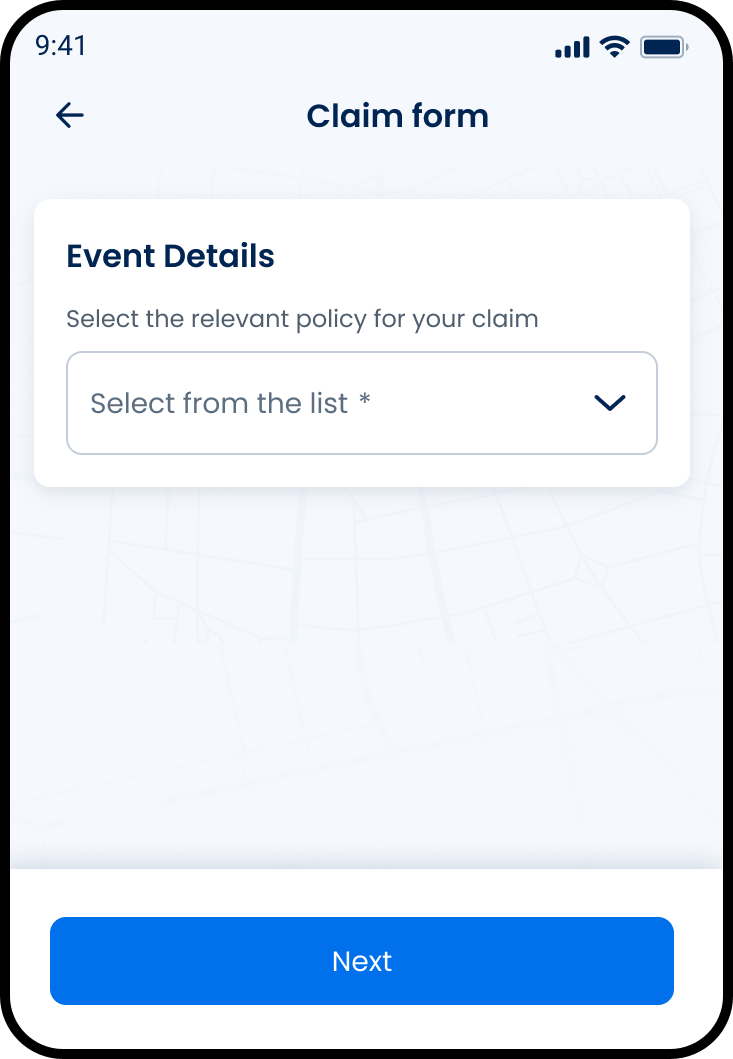
This screen includes:
| # | Element | Description |
|---|---|---|
| 1 | Page title | Displays Submit claim. |
| 2 | Back action | Returns to the previous screen. |
| 3 | Claim details card | Contains the claim fields. |
| 4 | Policy selector | Selects the claim policy. |
| 5 | Appointment selector | Selects the claim appointment. |
| 6 | Continue action | Continues the claim flow. |
Workflow
- Open Submit claim.
- Select a policy.
- Select an appointment.
- Select Continue.
- Submit the claim request.
- Show success or error state.
Validations
| Scenario | App behavior | SDK output |
|---|---|---|
| Session invalid | Block claim submission | state = unauthenticated |
| Policy missing | Disable Continue | validation = policy_required |
| Appointment missing | Disable Continue | validation = appointment_required |
| Policy and appointment selected | Enable Continue | state = ready |
| Policy invalid | Display claim submission error | error = invalid_policy |
| Appointment invalid | Display claim submission error | error = invalid_appointment |
| Request rejected | Display error state | status = 405 |
Actions
| Scenario | App behavior | SDK output |
|---|---|---|
| Screen opens | Load submit claim form | PUT /api/v3/claims/submit |
| Policy selected | Update selected policy | policy = selected |
| Appointment selected | Update selected appointment | appointment = selected |
| Continue selected | Submit claim | POST /api/v3/claims/submit |
| Claim succeeds | Complete claim submission | status = 204 |
| Claim fails | Display claim submission error | state = error |
| Back selected | Return to previous screen | navigation = back |
Endpoint Resources
Submit Claim Form
PUT
v3/claims/submit
Returns the submit claim form.
Move to Next Step
PATCH
v3/claims/submit/next
Validates the current claim step and moves the claim form to the next step.
Move to Previous Step
PATCH
v3/claims/submit/back
Moves the claim form back to the previous step.
Change Policy
PATCH
v3/claims/submit/update-policy
Updates the selected claim policy and refreshes the current claim expenses with the new policy context.
Change Visit
PATCH
v3/claims/submit/update-visit
Updates the selected claim visit and refreshes the current claim form with the appointment and policy context.
Submit Claim
POST
v3/claims/submit
Submits the insurance claim. A successful request returns 204 with no response body.