Show Warnings
Use Show Warnings to present a validation message when the claim does not meet the requirements for the next submission step.
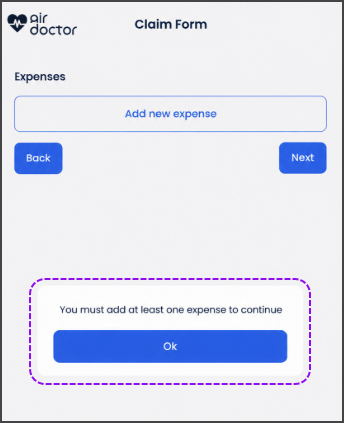
This screen includes:
| # | Element | Description |
|---|---|---|
| 1 | Expenses section | Displays the claim expense area |
| 2 | Add new expense action | Opens the expense entry flow |
| 3 | Next action | Validates the current claim step |
| 4 | Warning message | States what the user must correct before continuation |
| 5 | Ok action | Dismisses the warning |
| 6 | Back action | Returns to the previous claim step |
Workflow
- Select Next on the claim form.
- Call
PUT /api/v3/claims/submit/warnings. - Render the returned warning when validation fails.
- Select Ok to close the warning.
- Correct the required claim information.
- Select Next again.
Validations
| Scenario | App behavior | SDK output |
|---|---|---|
| Claim step contains a validation issue | Display the applicable warning | Page object |
| No expense exists | State that at least one expense is required | Warning page |
| Validation requirement is met | Allow continuation to the next claim step | Claim flow continues |
Actions
| Scenario | App behavior | SDK output |
|---|---|---|
| Next selected | Check the current claim step | PUT /api/v3/claims/submit/warnings |
| Ok selected | Close the warning | Close action |
| Add new expense selected | Open the expense entry flow | Navigation event |
| Back selected | Return to the previous claim step | Navigation event |
Endpoint Resources
Show Warnings
PUT
v3/claims/submit/warnings
Returns the applicable validation warning for the current claim submission step.