Show Claim Details
Use Show Claim Details to display claim information for a selected appointment.
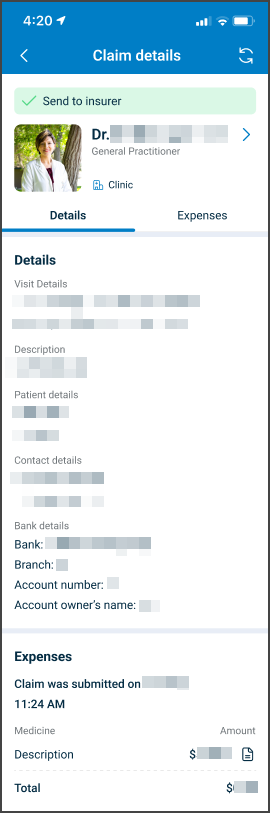
This screen includes:
| # | Element | Description |
|---|---|---|
| 1 | Claim details header | Displays the doctor, specialty, and back navigation. |
| 2 | Claim tabs | Provides access to Details, Expenses, and Documents. |
| 3 | Appointment information | Displays provider, specialty, date, location, phone, and email. |
| 4 | Patient details | Displays the patient name. |
| 5 | Contact information | Displays contact name, phone, email, and address. |
| 6 | Event details | Displays the claim description and attached documents. |
| 7 | Show more action | Expands long event details. |
| 8 | Document rows | Display attached document names with preview actions. |
| 9 | Bank details | Displays reimbursement bank account information. |
Workflow
- Open My claims.
- Select More info on a claim card.
- Load the claim details screen.
- Review appointment, patient, contact, event, document, and bank details.
- Select Expenses or Documents to view another claim tab.
- Select Show more to expand long event details.
- Select a document preview action to view an attached file.
Validations
| Scenario | App behavior | SDK output |
|---|---|---|
| Session invalid | Block claim details | state = unauthenticated |
| Appointment missing | Display error state | error = appointment_required |
| Claim details available | Display claim details | claimDetails = loaded |
| Claim tab selected | Display selected tab | tab = selected |
| Document unavailable | Display error state | error = document_unavailable |
| Request rejected | Display error state | status = 405 |
Actions
| Scenario | App behavior | SDK output |
|---|---|---|
| Claim details opened | Load claim details screen | PUT /api/v3/claims/details/{appointment-id} |
| Details selected | Display claim details tab | tab = details |
| Expenses selected | Display expenses tab | tab = expenses |
| Documents selected | Display documents tab | tab = documents |
| Show more selected | Expand event details | eventDetails = expanded |
| Document preview selected | Open attached document | document = opened |
| Claim details refreshed | Update current claim details | PATCH /api/v3/claims/details/update |
| Back selected | Return to claims list | navigation = back |
Endpoint Resources
Show Claim Details
PUT
v3/claims/details/{appointment-id}
Returns the claim details for an appointment with the selected details, documents, or expenses tab.
Update Claim Details
PATCH
v3/claims/details/update
Refreshes the current claim details screen.