Video Room Time Error
Use Video Room Time Error when the user cannot join a video consultation because the session has ended or has not started yet.
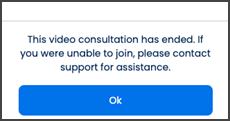
This screen includes:
| # | Element | Description |
|---|---|---|
| 1 | Error modal | Displays the video consultation error. |
| 2 | Error message | Explains that the video consultation has ended. |
| 3 | Support instruction | Tells the user to contact support if they cannot join. |
| 4 | OK action | Closes the modal. |
Workflow
- Open the video room for an appointment.
- Check whether the video consultation is joinable.
- Display the scheduled time modal when the consultation has not started yet.
- Display the time error modal when the consultation has ended.
- Select OK to close the modal.
Scheduled Video Visit
Use this state when the video visit is scheduled but the session is not open yet.
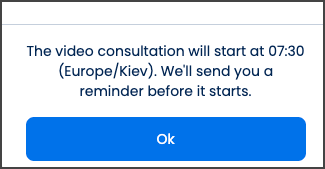
This screen includes:
| # | Element | Description |
|---|---|---|
| 1 | Scheduled time modal | Informs the user when the video consultation will start. |
| 2 | Start time message | Displays the scheduled video visit time and time zone. |
| 3 | Reminder message | Explains that the user will receive a reminder before the visit starts. |
| 4 | OK action | Closes the modal. |
Validations
| Scenario | App behavior | SDK output |
|---|---|---|
| Appointment missing | Display error state | error = appointment_required |
| Video consultation ended | Display time error modal | error = video_room_ended |
| Video consultation joinable | Continue to video room | videoRoom = available |
| Request rejected | Display error state | status = 405 |
Actions
| Scenario | App behavior | SDK output |
|---|---|---|
| Time error detected | Load error modal | PUT /api/v3/appointments/{appointment-id}/video-room/error |
| OK selected | Close modal | state = dismissed |
| Request rejected | Preserve current state | state = unchanged |
Endpoint Resources
Time Error
PUT
v3/appointments/{appointment-id}/video-room/error
Returns the time error modal when the user can no longer join the video consultation.