Delete Account with Password Confirmation
Use Delete Account with Password Confirmation to verify the current password before account deletion.
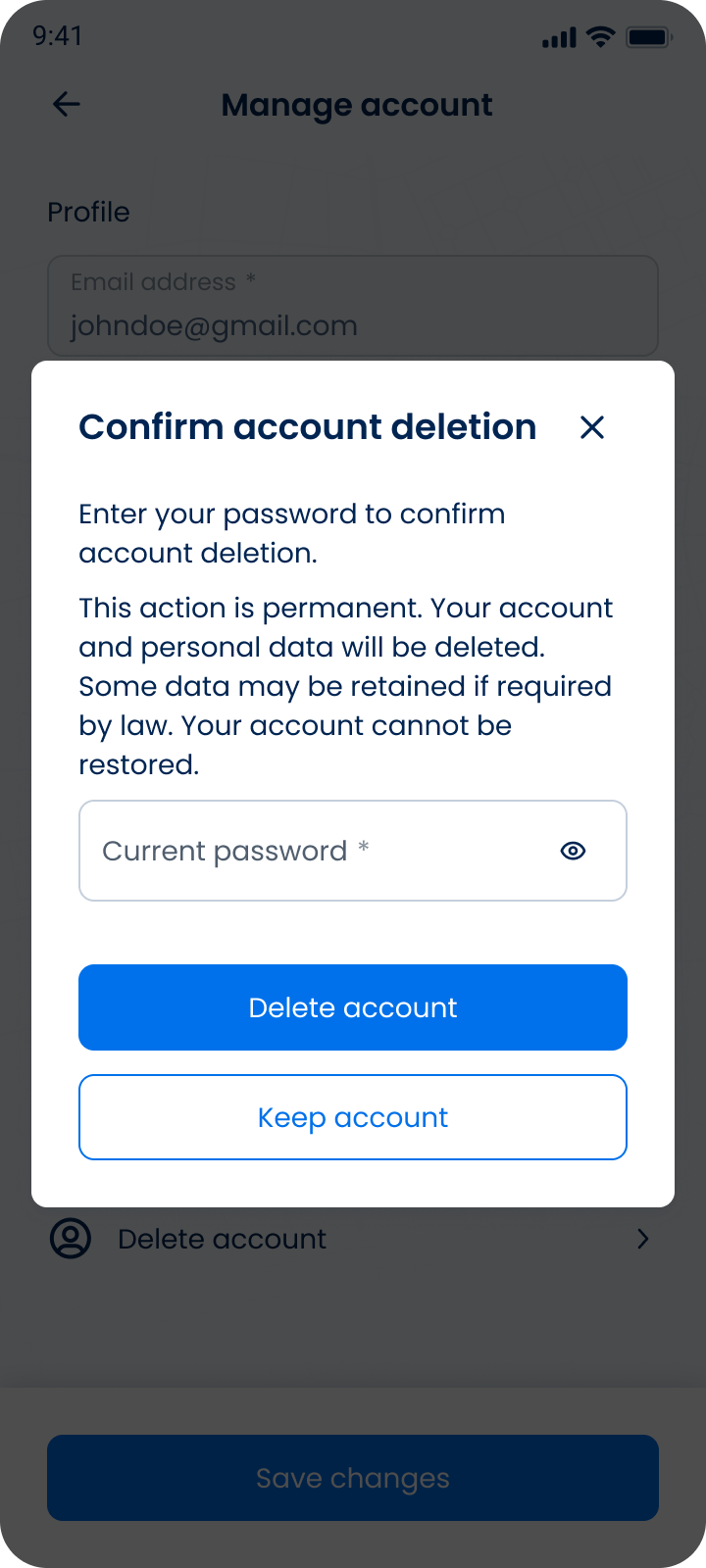
This screen includes:
| # | Element | Description |
|---|---|---|
| 1 | Modal title | Displays Confirm account deletion. |
| 2 | Close action | Dismisses the modal. |
| 3 | Warning text | Explains that deletion is permanent and the account cannot be restored. |
| 4 | Current password field | Requires the current account password and includes a visibility toggle. |
| 5 | Delete account action | Submits the account deletion request. |
| 6 | Keep account action | Cancels deletion and closes the modal. |
Workflow
- Open Manage account.
- Select Delete account.
- Display the password confirmation modal.
- Enter the current password.
- Enable Delete account after a valid password entry.
- Submit the deletion request.
- Show success or error state.
Validations
| Scenario | App Behavior | SDK Output |
|---|---|---|
| Password field is empty | Keep delete action unavailable | state = invalid |
| Password format is invalid | Display password validation error | error = invalid_password |
| Password is incorrect | Display credentials error | error = invalid_credentials |
| Session invalid | Block deletion request | state = unauthenticated |
| Delete request succeeds | Complete account deletion | state = deleted |
| Delete request fails | Display error state | state = error |
Actions
| Scenario | App Behavior | SDK Output |
|---|---|---|
| Delete account selected | Open password confirmation modal | PUT /api/v3/account/delete/confirm |
| Password entered | Update password field state | password = updated |
| Visibility toggle selected | Show or hide password text | passwordVisible = true/false |
| Delete account action selected | Submit deletion request | POST /api/v3/account/delete/password |
| Keep account selected | Cancel deletion and close the modal | state = cancelled |
| Close selected | Close the modal without deletion | state = dismissed |
| Delete request succeeds | Delete account data and end session | state = deleted |
| Delete request fails | Preserve modal state | state = error |
Endpoint Resources
Delete Data by Password
PUT
v3/account/delete/confirm
Returns the delete account confirmation screen that requires password verification..
Personal Data by Password
POST
v3/account/delete/password/delete
Deletes the authenticated user account after valid password confirmation.