Delete Data Error
Use the Delete Data Error modal to show password validation feedback when account deletion cannot continue.
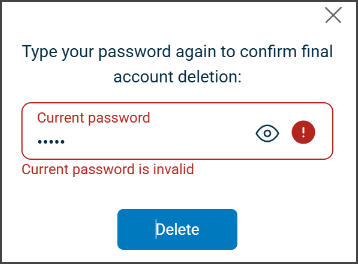
This screen includes:
| # | Element | Description |
|---|---|---|
| 1 | Close action | Dismisses the confirmation modal |
| 2 | Instruction text | Explains that the user must enter the password to confirm account deletion |
| 3 | Current password field | Required input with visibility toggle |
| 4 | Validation error | Displays invalid password feedback |
| 5 | Delete action | Submits the account deletion request |
Workflow
- Open the Manage Data screen > Delete acount.
- Enter invalid password.
- Select Delete.
- Display validation feedback when the password is invalid.
- Correct the password or close the modal.
Validations
| Scenario | App Behavior | SDK Output |
|---|---|---|
| Password invalid | Display validation error | error = invalid_credentials |
| Password empty | Disable Delete | validation = required |
| Request blocked | Display restriction message | HTTP 405 |
Actions
| Scenario | App Behavior | SDK Output |
|---|---|---|
| Password entered | Update input state | password = updated |
| Visibility toggle selected | Toggle password visibility | passwordVisible = true/false |
| Delete selected | Submit deletion request | Delete request triggered |
| Close selected | Dismiss modal | No state change |
Endpoint Resources
Delete Data Error
PUT
v3/account/delete/error
Displays delete personal data error popup.