Clinic Updated
Use Clinic No Longer Available when updated request details make the selected clinic unavailable.
This endpoint applies to users who enter the Wizard from a direct link. The app redirects the patient to the Home screen and displays the popup.
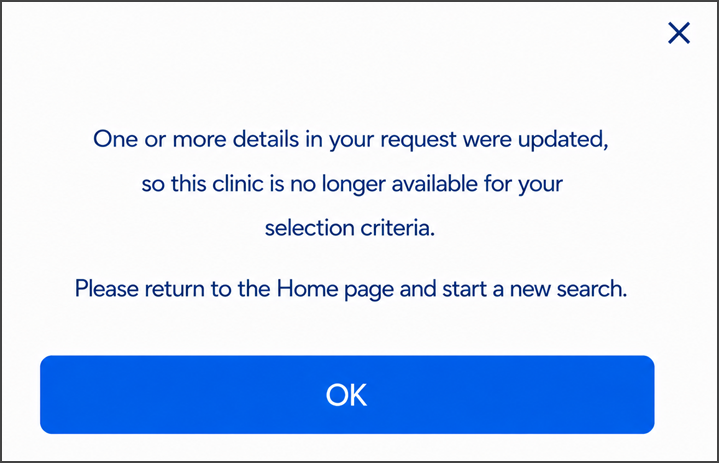
This screen includes:
| # | Element | Description |
|---|---|---|
| 1 | Unavailable message | Explains why the clinic is unavailable |
| 2 | Start new search action | Closes the popup on the Home screen |
| 3 | Close action | Dismisses the popup |
Workflow
- Detect an update to the appointment request.
- Confirm that the selected clinic no longer matches the request.
- Redirect the patient to the Home screen.
- Call
PUT /api/v3/appointments/book/error/clinic-unavailable. - Display the Clinic no longer available popup.
- Select Start new search.
- Close the popup and remain on the Home screen.
Validations
| Scenario | App behavior | SDK output |
|---|---|---|
| Selected clinic is unavailable | Redirect to Home and display the popup | Page object |
Request returns 200 | Render the returned popup | Page object |
Request returns 405 | Display an application error | Error response |
| Session is invalid | Reject the request | Authentication error |
Actions
| Scenario | App behavior | SDK output |
|---|---|---|
| Start new search selected | Close the popup and remain on Home | Close event |
| Close selected | Dismiss the popup and remain on Home | Close event |
Endpoint Resources
Clinic Updated
PUT
v3/appointments/book/error/clinic-unavailable
Returns the Clinic no longer available popup for users who enter the Wizard from a direct link.