Select Patient
Use the Select patient modal to choose an existing patient profile during the appointment request flow
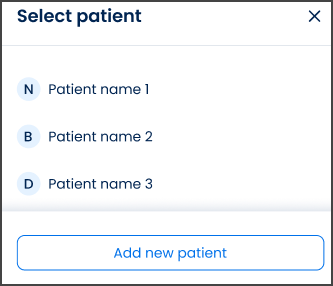
This screen includes:
| # | Element | Description |
|---|---|---|
| 1 | Patient name field | Opens the patient selector from Patient details |
| 2 | Modal title | Displays Select patient |
| 3 | Close action | Dismisses the modal without changing the selected patient |
| 4 | Patient list | Displays existing patient profiles |
| 5 | Patient option | Selects one patient for the appointment request |
| 6 | Add a new patient action | Opens the Add a new patient modal |
Workflow
- Open the appointment request flow.
- Select Patient name in Patient details.
- Review the existing patient profiles.
- Select an existing patient or select Add a new patient.
- Return to the appointment request with the selected patient.
Validations
| Scenario | App Behavior | SDK Output |
|---|---|---|
| No patient profiles exist | Display Add a new patient action | patients = empty |
| No patient selected | Keep appointment request incomplete | validation = patient_required |
| Patient list fails to load | Display error state | error = patients_load_failed |
| Request in progress | Show loading state | state = loading |
| Request blocked | Display restriction message | HTTP 405 |
Actions
| Scenario | App Behavior | SDK Output |
|---|---|---|
| Patient name selected | Open patient selector | Patient selector opened |
| Patient selected | Assign patient to appointment request | patient = selected |
| Add a new patient selected | Open patient creation modal | Navigation or modal event |
| Close selected | Dismiss selector without changes | No state change |
Endpoint Resources
Patients
PUT
v3/patients
Returns the patient selection page model with existing patient profiles.
Parameter Reference
| Parameter | Type | Required | Description |
|---|---|---|---|
patient-details-id | integer | Yes | Existing patient identifier in the current flow context |
Save Selected Patient
POST
v3/patients/select
Sets the selected patient as active in the current appointment flow.