Rating Submitted
Use Rating Submitted to confirm that the user’s rating response was submitted.
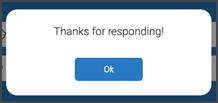
This screen includes:
| # | Element | Description |
|---|---|---|
| 1 | Confirmation modal | Confirms that the rating response was submitted. |
| 2 | Confirmation message | Displays Thanks for responding! |
| 3 | OK action | Closes the modal. |
| 4 | Background screen | Shows the previous screen behind the modal. |
Workflow
- Submit a rating response.
- Display the confirmation modal.
- Select OK.
- Close the modal and return to the previous screen.
Validations
| Scenario | App behavior | SDK output |
|---|---|---|
| Rating submitted | Display confirmation modal | rating = submitted |
| Submission already confirmed | Keep confirmation state | rating = submitted |
| Request rejected | Display error state | status = 405 |
Actions
| Scenario | App behavior | SDK output |
|---|---|---|
| Rating response submitted | Load confirmation modal | PUT /api/v3/rating/submitted |
| OK selected | Close confirmation modal | state = dismissed |
| Request rejected | Preserve current state | state = unchanged |
Endpoint Resources
Rating Submitted
PUT
v3/rating/submitted
Returns the (thank you) modal after the user submits a rating.