Doctor Rating
Use Doctor Rating to collect feedback about the doctor after an appointment.
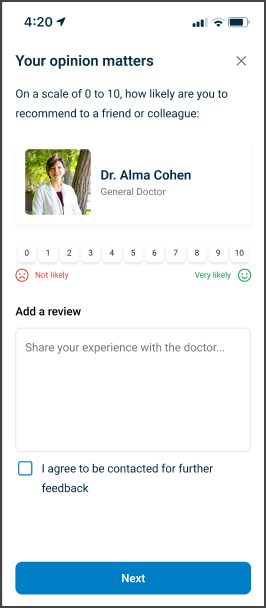
This screen includes:
| # | Element | Description |
|---|---|---|
| 1 | Doctor feedback modal | Collects feedback about the doctor. |
| 2 | Modal title | Displays Your opinion matters. |
| 3 | Close action | Closes the modal. |
| 4 | Doctor photo | Displays the doctor profile image. |
| 5 | Rating title | Displays the doctor rating prompt. |
| 6 | Rating question | Asks for recommendation likelihood. |
| 7 | Rating scale | Lets the user select a score from 0 to 10. |
| 8 | Rating labels | Defines 0 = Not likely and 10 = Very likely. |
| 9 | Review text field | Accepts optional doctor review text. |
| 10 | Character limit hint | Shows the 200-character limit. |
| 11 | Continue action | Continues to the next feedback step. |
Workflow
- Open the doctor rating screen.
- Select a rating from 0 to 10.
- Enter optional review text.
- Select Continue.
- Submit the doctor rating.
- Continue to the next rating step or confirmation state.
Validations
| Scenario | App behavior | SDK output |
|---|---|---|
| Rating not selected | Disable Continue | validation = rating_required |
| Rating selected | Enable Continue | rating = selected |
| Review exceeds character limit | Display character limit state | validation = max_length_exceeded |
| Review within character limit | Accept review text | review = valid |
| Rating submitted | Continue rating flow | rating = submitted |
| Request rejected | Display error state | status = 405 |
Actions
| Scenario | App behavior | SDK output |
|---|---|---|
| Doctor rating opens | Load doctor rating screen | PUT /api/v3/rating/profile |
| Rating selected | Update selected rating | rating = updated |
| Review entered | Update review text | review = updated |
| Continue selected | Submit doctor rating | POST /api/v3/rating/profile |
| Close selected | Close the modal | state = dismissed |
| Request rejected | Preserve current state | state = unchanged |
Endpoint Resources
Doctor Rating
PUT
v3/rating/profile
Returns the doctor rating screen.
Proceed Doctor Rating
POST
v3/rating/profile
Submits the doctor rating.