Invalid Policy Dates Error
Use Invalid Policy Dates Error when the selected coverage is not valid for the appointment date.
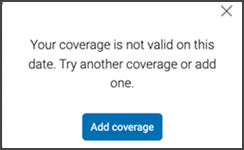
This screen includes:
| # | Element | Description |
|---|---|---|
| 1 | Error modal | Displays the coverage date validation error. |
| 2 | Close action | Closes the modal. |
| 3 | Error message | Explains that the selected coverage is not valid for the appointment date. |
| 4 | Add coverage action | Opens the add coverage flow. |
Workflow
- Select a policy or coverage option.
- Validate the selected coverage against the appointment date.
- Display the error modal when the coverage is not valid for that date.
- Select Add coverage to add another coverage option.
- Select the close action to dismiss the modal.
Validations
| Scenario | App behavior | SDK output |
|---|---|---|
| Session invalid | Block request | state = unauthenticated |
| Coverage missing | Display error state | error = coverage_required |
| Coverage date not valid | Display error modal | error = policy_dates_not_valid |
| Coverage date valid | Continue flow | coverage = valid |
| Request rejected | Display error state | status = 405 |
Actions
| Scenario | App behavior | SDK output |
|---|---|---|
| Coverage date not valid | Load error modal | PUT /api/v3/policies/policy-dates-not-valid |
| Add coverage selected | Open add coverage flow | navigation = add_coverage |
| Close selected | Dismiss modal | state = dismissed |
| Request rejected | Preserve current state | state = unchanged |
Endpoint Resources
Policy Dates Not Valid Error
PUT
v3/policies/policy-dates-not-valid
Returns the error modal for coverage that is not valid on the appointment date.