Offline Mode
Use Offline Mode to define the app behavior when the device has no active internet connection.
Offline Mode keeps available appointment information visible and provides offline support contact options. The available controls depend on the active screen.
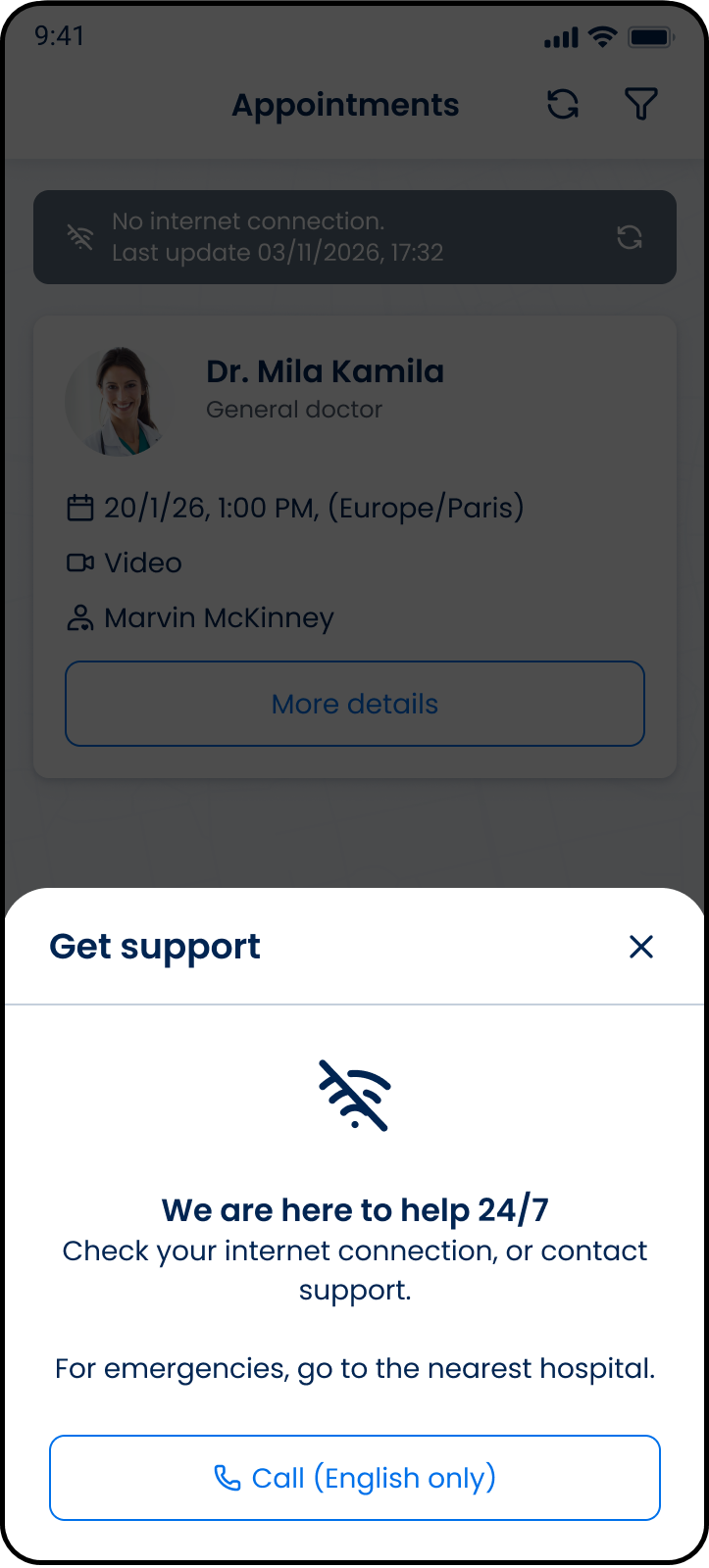
This screen includes:
| # | Element | Description |
|---|---|---|
| 1 | Header | Displays screen title and navigation actions |
| 2 | Offline banner | Displays connection status and last update time |
| 3 | Cached appointment card | Displays synchronized appointment data |
| 4 | More details action | Opens cached appointment details |
| 5 | Support modal | Displays offline support options |
| 6 | Offline status icon | Displays offline connectivity state |
| 7 | Support message | Displays offline support guidance |
| 8 | Emergency message | Displays emergency instructions |
| 9 | Call action | Opens the device dialer |
| 10 | Close action | Dismisses the support modal |
Offline Behavior by Area
| Area | Offline behavior |
|---|---|
| Appointment list | Keeps available appointment information visible |
| Chat / Support | Replaces online chat access with offline support contact options |
Workflow
Appointment list
- Detect that the device has no active internet connection.
- Keep available appointment information visible.
- Allow access to appointment information that remains available offline.
Support
- Select the support action.
- Display the Get support modal.
- Review the WhatsApp support instructions or select Call (English only).
- Close the modal to return to the appointment list.
Validations
| Scenario | App behavior | SDK output |
|---|---|---|
| Internet connection is unavailable | Apply the supported offline state | Offline page or update state |
| Appointment information is available | Keep the appointment information visible | Available appointment data |
| Online support is unavailable | Display offline support contact options | Support UI update |
| Required online data is unavailable | Prevent the affected action | Error or unavailable state |
Actions
| Scenario | App behavior | SDK output |
|---|---|---|
| More details selected | Open available appointment information | Navigation event |
| Support selected | Open the Get support modal | UI update |
| Call selected | Open the device call action | External action |
| Close selected | Dismiss the support modal | Close event |