Filters
Use the Filters drawer to refine doctor search results.
The drawer displays filters that apply to the active specialty, location, and visit type.
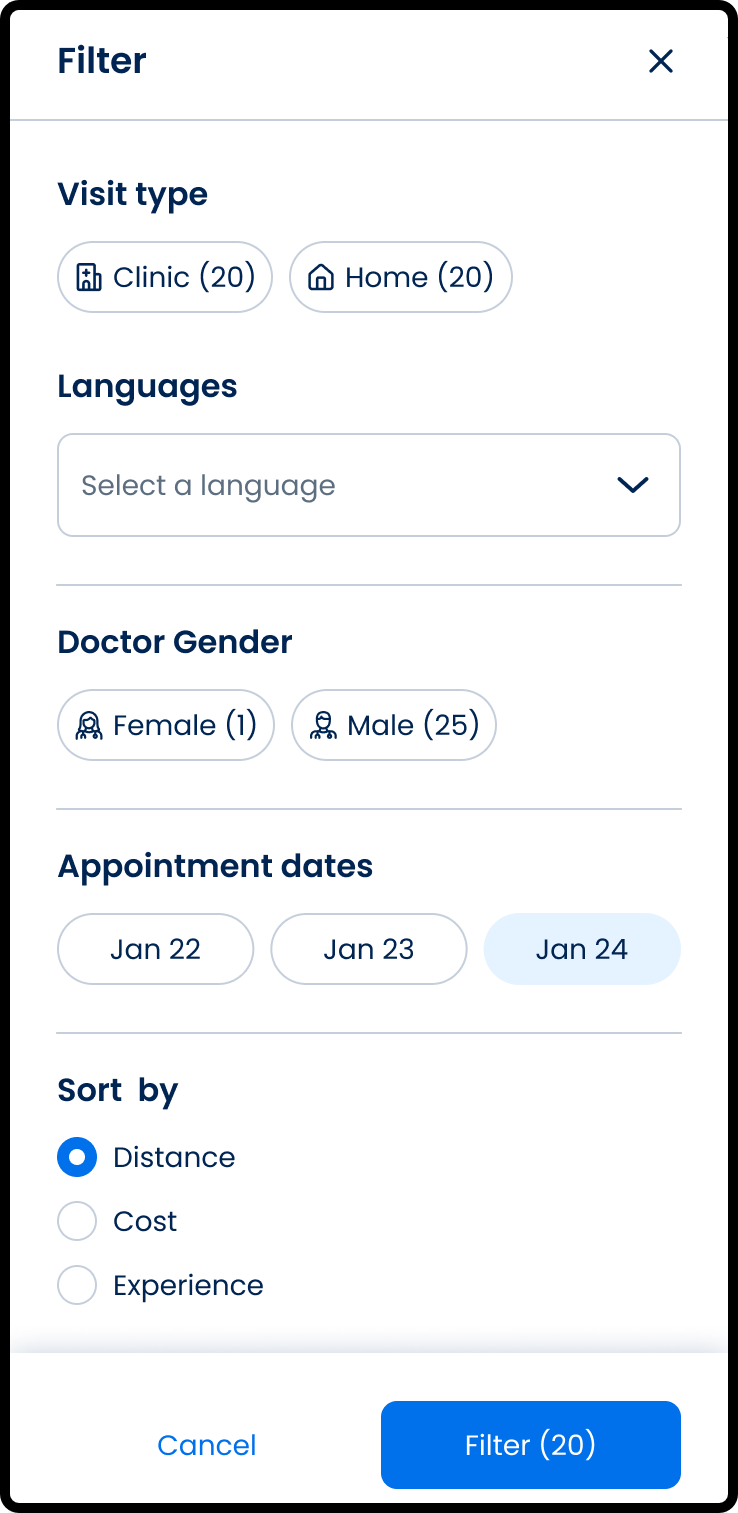
This screen includes:
| # | Element | Description |
|---|---|---|
| 1 | Header | Displays the Filter title and close action |
| 2 | Visit type section | Displays available visit type filters |
| 3 | Language selector | Opens the preferred language filter |
| 4 | Doctor gender section | Filters results by doctor gender |
| 5 | Appointment dates section | Filters results by available dates |
| 6 | Prescription option | Filters results by prescription availability |
| 7 | Sort section | Sorts results by the selected option |
| 8 | Reset filters action | Clears selected filters |
| 9 | Filter action | Applies selected filters to the result set |
Workflow
- Open the Doctor List screen.
- Select the filter action.
- Open the Filters drawer.
- Select filter and sort options.
- Select Filter.
- Return updated results to the Doctor List.
Validations
| Scenario | App Behavior | SDK Output |
|---|---|---|
| Filter drawer opens | Display current filter criteria | PUT /api/v3/doctors/filter |
| Filter value changes | Update the active filter state | PATCH /api/v3/doctors/filter |
| Preferred language changes | Update language filter state | PATCH /api/v3/doctors/update-from-preferred-language |
| Reset filters selected | Restore default filter values | PATCH /api/v3/doctors/filter/reset |
| Filter applied | Refresh Doctor List results | PATCH /api/v3/doctors/update |
| Request fails | Display error state | status = 405 |
Actions
| Scenario | App Behavior | SDK Output |
|---|---|---|
| Filter action selected | Open the filter drawer | PUT /api/v3/doctors/filter |
| Filter option selected | Update filter state | PATCH /api/v3/doctors/filter |
| Language selector selected | Open preferred language filter | navigation = preferred_language_filter |
| Preferred language saved | Update filter state with selected languages | PATCH /api/v3/doctors/update-from-preferred-language |
| Reset filters selected | Clear selected filters | PATCH /api/v3/doctors/filter/reset |
| Filter selected | Apply filters and refresh results | PATCH /api/v3/doctors/update |
| Close selected | Close the drawer without applying changes | navigation = dismiss |
Endpoint Resources
Doctor Filter
PUT
v3/doctors/filter
Opens the doctor list filter screen with the current search and filter criteria.
Update Doctor Filter
PATCH
v3/doctors/filter
Updates the doctor filter based on the selected search and filter criteria.
Reset Filter
PATCH
v3/doctors/filter/reset
Resets the doctor filter to its default state.
Update Doctor Filter Preferred Language
PATCH
v3/doctors/update-from-preferred-language
Updates the doctor filter using the selected preferred language criteria.
Update Doctor List by Location Type
PATCH
/v3/doctors/update
Updates the doctor list based on the selected visit type, sort option, and specialty.
Update Doctor Card Details
PATCH
v3/doctors/update/doctor-card
Refreshes doctor card details for the selected doctors based on the applied search and filter criteria.
Apply Doctor List Filter
PUT
v3/profiles/filter
Applies the selected doctor list filters and sort values, then returns to the filtered doctor list.