Require Travel Dates
Use Required Travel Dates when the selected appointment date falls outside the travel period for the selected coverage.
The user must add valid travel dates or add another coverage before the booking flow continues.
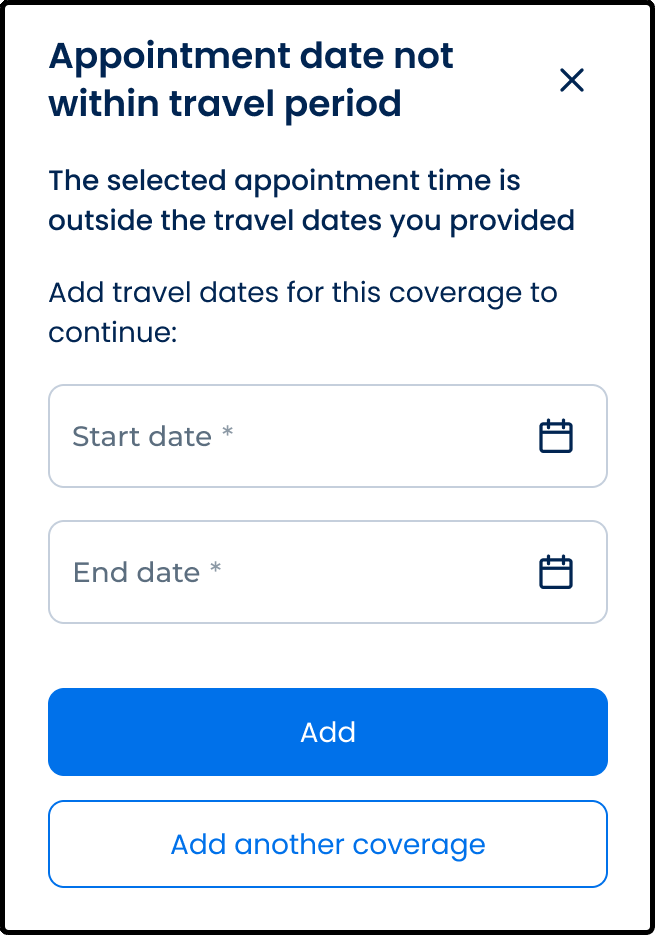
This screen includes:
| # | Element | Description |
|---|---|---|
| 1 | Dialog title | Explains that the appointment date is outside the coverage travel period |
| 2 | Close action | Dismisses the popup |
| 3 | Information message | Explains that travel dates are required to continue |
| 4 | Start date field | Collects the travel start date |
| 5 | End date field | Collects the travel end date |
| 6 | Date picker action | Opens date selection |
| 7 | Add action | Saves travel dates for the selected coverage |
| 8 | Add another coverage action | Opens the coverage creation flow |
Workflow
- Start booking with coverage that requires travel dates.
- Detect that the appointment date is outside the saved travel period.
- Render the Required Travel Dates popup.
- Enter start and end dates.
- Save the required travel dates.
- Continue booking or add another coverage.
Validations
| Scenario | App Behavior | SDK Output |
|---|---|---|
| Start date missing | Block submission | validation = required |
| End date missing | Block submission | validation = required |
| Start date after end date | Display date-range error | error = invalid_date_range |
| Appointment date outside travel period | Keep popup open | error = outside_travel_period |
| Request rejected | Display error state | status = 405 |
| Save succeeds | Continue booking flow | travelDates = saved |
Actions
| Scenario | App Behavior | SDK Output |
|---|---|---|
| Required Travel Dates opened | Load popup | PUT /api/v3/travel-dates/required |
| Date entered | Update popup state | travelDates = updated |
| Add selected | Save required travel dates | POST /api/v3/travel-dates/required/create |
| Save succeeds | Continue booking flow | state = saved |
| Add another coverage selected | Open coverage creation flow | navigation = add_coverage |
| Close selected | Dismiss popup | state = unchanged |
Endpoint Resources
Required Travel Dates
PUT
travel-dates/required
Returns the required travel dates popup
Save Required Travel Dates
POST
travel-dates/required/create
Saves required travel dates.