Show Association Success
Use Show Association Success to confirm that a selected coverage provider has been added to the user's account.
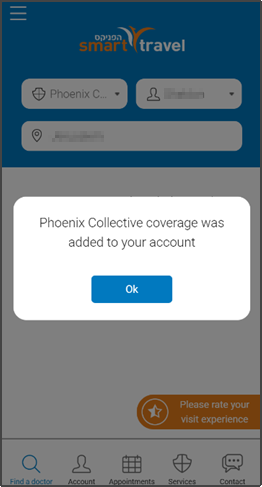
This screen includes:
| # | Element | Description |
|---|---|---|
| 1 | Success modal | Confirms that the selected coverage was added to the user account. |
| 2 | Success message | Displays the coverage provider name and confirms account association. |
| 3 | OK action | Dismisses the success modal and returns the user to the current screen. |
| 4 | Background overlay | Blocks interaction with the underlying page while the modal is open. |
Workflow
- Submit coverage details.
- Verify the coverage association.
- Display the success modal after coverage is added.
- Select Ok to close the modal.
- Return to the current screen with the updated coverage context.
Validations
| Scenario | App Behavior | SDK Output |
|---|---|---|
| Session invalid | Block coverage association | state = unauthenticated |
| Coverage association succeeds | Display success modal | coverage = associated |
| Coverage provider missing | Display error state | error = coverage_required |
| Success content fails to load | Display error state | state = error |
| Request rejected | Display error state | status = 405 |
Actions
| Scenario | App Behavior | SDK Output |
|---|---|---|
| Coverage details submitted | Submit coverage association request | POST /api/v3/coverage/add/new-coverage |
| Association succeeds | Load success modal | PUT /api/v3/coverage/add/new-coverage/success |
| OK selected | Dismiss success modal | state = dismissed |
| Modal dismissed | Return to current screen | navigation = current |
| Request rejected | Preserve current state | state = unchanged |
Endpoint Resources
Show Association Success
PUT
v3/coverage/add/new-coverage/success
Returns a success popup when the selected coverage provider is associated with the user account.