Show Policy Wrong Data
Use Show Policy Wrong Data to show an error when the submitted policy details do not match the selected provider records.
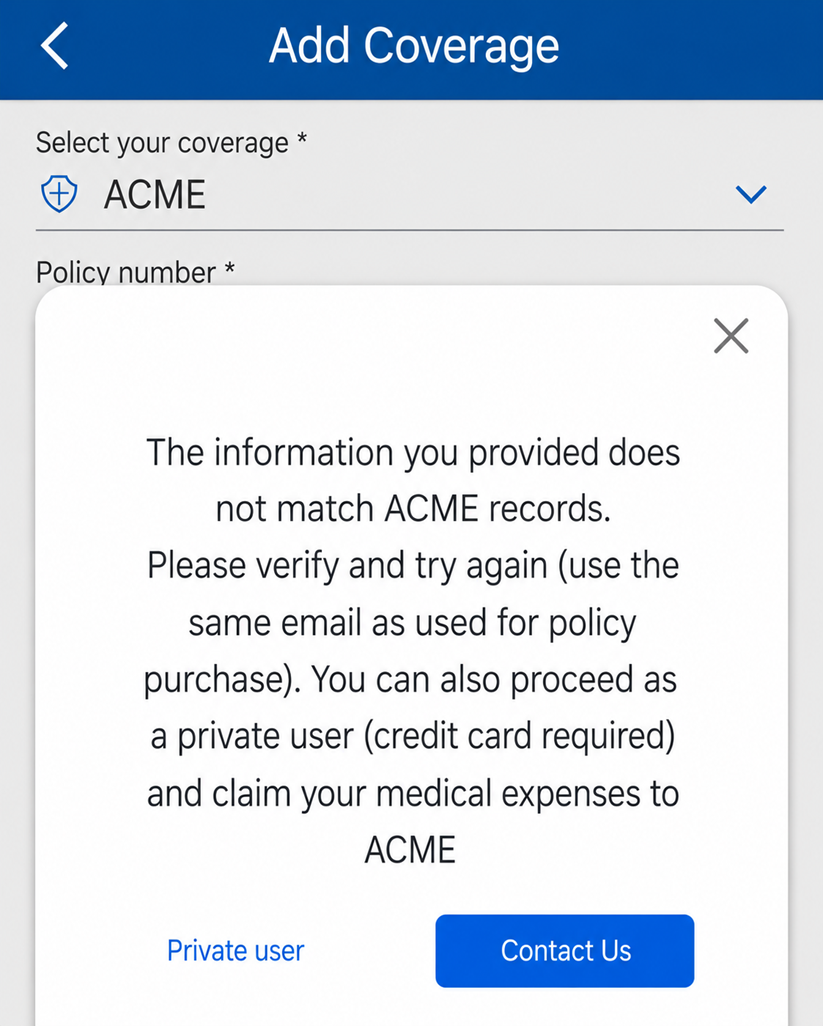
This screen includes:
| # | Element | Description |
|---|---|---|
| 1 | Error modal | Displays the invalid policy data message. |
| 2 | Close action | Dismisses the modal. |
| 3 | Modal title | Displays Invalid Policy Data. |
| 4 | Error message | Instructs the user to check the policy details and enter the values exactly as shown in the policy. |
| 5 | Try Again action | Returns the user to the policy form. |
| 6 | Chat with Support action | Opens support chat for help with policy verification. |
Workflow
- Open Add Coverage.
- Select a coverage provider.
- Enter the required policy details.
- Submit the policy verification request.
- Display the error modal when provider records do not match the submitted details.
- Select Try Again to return to the policy form.
- Select Chat with Support to contact support.
Validations
| Scenario | App behavior | SDK output |
|---|---|---|
| Session invalid | Block policy verification | state = unauthenticated |
| Coverage provider missing | Disable Continue | validation = coverage_required |
| Policy details missing | Disable Continue | validation = policy_details_required |
| Provider records do not match | Display invalid policy data modal | error = wrong_policy_data |
| Policy verification succeeds | Continue coverage flow | coverage = verified |
| Request rejected | Display error state | status = 405 |
Actions
| Scenario | App behavior | SDK output |
|---|---|---|
| Policy details submitted | Verify provider records | POST /api/v3/coverage/add/new-coverage |
| Wrong data returned | Load invalid policy data modal | PUT /api/v3/coverage/add/new-coverage/error/wrong-policy-data |
| Try Again selected | Return to policy form | navigation = retry |
| Chat with Support selected | Open support chat | action = chat_support |
| Close selected | Dismiss modal | state = dismissed |
| Request rejected | Preserve entered policy details | state = unchanged |
Endpoint Resources
Show Policy Wrong Data
PUT
v3/coverage/add/new-coverage/error/wrong-policy-data
Returns the invalid policy data modal when submitted policy details do not match provider records.