Add Travel Dates Form
Use Add Travel Dates Form to enter a travel date range before saving it to the selected coverage.
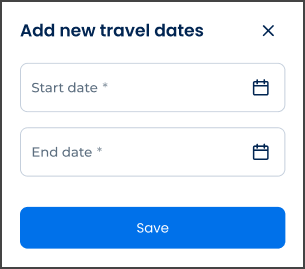
This screen includes:
| # | Element | Description |
|---|---|---|
| 1 | Header | Displays form title and close action |
| 2 | Start date field | Sets the travel start date |
| 3 | End date field | Sets the travel end date |
| 4 | Validation message | Displays date validation errors |
| 5 | Add action | Adds the travel date range as a draft |
| 6 | Cancel action | Closes the form without changes |
Workflow
- Open Travel Dates.
- Select Add new travel dates.
- Render the add form.
- Enter start and end dates.
- Validate the date range.
- Add the draft date range to the Travel Dates screen.
Validations
| Scenario | App Behavior | SDK Output |
|---|---|---|
| Start date missing | Block submission | validation = required |
| End date missing | Block submission | validation = required |
| Start date after end date | Display date-range error | error = invalid_date_range |
| Date outside coverage period | Display coverage-date error | error = outside_coverage_period |
| Dates overlap existing period | Display overlap error | error = overlapping_travel_dates |
| Request blocked | Display restriction message | status = 405 |
Actions
| Scenario | App Behavior | SDK Output |
|---|---|---|
| Add form opened | Load add form | PUT /api/v3/travel-dates/add |
| Travel dates entered | Update form state | travelDates = updated |
| Add selected | Validate and add draft row | PATCH /api/v3/travel-dates/add |
| Form closed | Return without changes | state = unchanged |
Endpoint Resources
Add Travel Dates Form
PUT
v3/travel-dates/add
Returns the add travel dates form.