Password MFA Verification
Use Password MFA Verification to verify a 6-digit MFA code before password change.
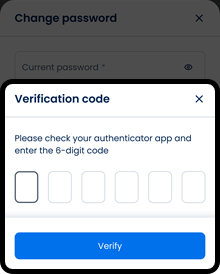
This screen includes:
| # | Element | Description |
|---|---|---|
| 1 | Verification code modal | Requests the 6-digit authentication code. |
| 2 | Close action | Closes the modal. |
| 3 | Modal title | Displays Verification code. |
| 4 | Instruction text | Directs the user to the authenticator app. |
| 5 | Code input fields | Accept the 6-digit verification code. |
| 6 | Verify action | Submits the verification code. |
| 7 | Background state | Shows the change password screen behind the modal. |
Workflow
- Start password change.
- Display the MFA verification modal when MFA is required.
- Enter the 6-digit authentication code.
- Select Verify.
- Complete password change after successful verification.
Validations
| Scenario | App behavior | SDK output |
|---|---|---|
| Session invalid | Block request | state = unauthenticated |
| MFA code missing | Disable Verify | validation = mfa_code_required |
| MFA code incomplete | Disable Verify | validation = mfa_code_incomplete |
| MFA code invalid | Display verification error | error = invalid_mfa_code |
| MFA code expired | Display expiration error | error = mfa_code_expired |
| MFA verification succeeds | Complete password change | state = verified |
| Request rejected | Display error state | status = 405 |
Actions
| Scenario | App behavior | SDK output |
|---|---|---|
| MFA required | Load verification modal | PUT /api/v3/account/password/mfa |
| MFA code entered | Update code state | mfaCode = updated |
| Verify selected | Submit MFA verification | POST /api/v3/account/password/change/mfa |
| Verification succeeds | Change password | state = password_changed |
| Close selected | Dismiss modal | state = dismissed |
| Request rejected | Preserve current state | state = unchanged |
Endpoint Resources
Password MFA Verification
PUT
v3/account/password/mfa
Returns the MFA verification modal.
Accept Change Password with MFA
POST
v3/account/password/change/mfa
Changes the password after MFA verification.