ASAP No Available Doctors
Use ASAP Unavailable to show the doctor results empty state when no doctors are available for the current ASAP search.
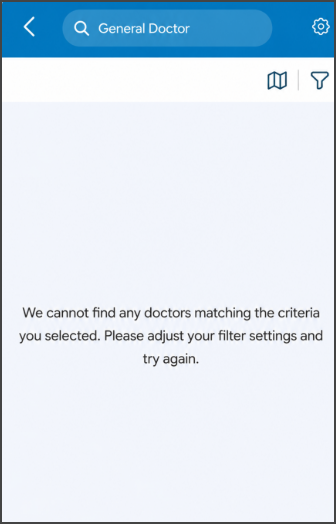
This screen includes:
| # | Element | Description |
|---|---|---|
| 1 | Header | Displays back navigation, the selected specialty search term, and settings access. |
| 2 | View toggle | Lets the user switch the doctor results view. |
| 3 | Filter action | Opens doctor search filters. |
| 4 | Empty results message | Explains that no doctors match the selected criteria. |
| 5 | Retry guidance | Instructs the user to adjust filter settings and try again. |
Workflow
- Start an ASAP search.
- Apply the selected specialty, location, and filters.
- Display the empty results state when no doctors are available.
- Update filters or location to search again.
- Return to the previous screen when needed.
Validations
| Scenario | App Behavior | SDK Output |
|---|---|---|
| Session invalid | Block search | state = unauthenticated |
| Location missing | Block ASAP search | validation = location_required |
| No available doctors found | Display empty results state | asap = unavailable |
| Filters exclude all doctors | Display empty results state | results = empty |
| Search criteria changed | Refresh doctor results | search = updated |
| Request rejected | Display error state | status = 405 |
Actions
| Scenario | App Behavior | SDK Output |
|---|---|---|
| Screen opens | Load ASAP no available doctors screen | PUT /api/v3/wizard/restriction/asap-no-available-doctors |
| Filter selected | Open doctor filters | filters = opened |
| Filter updated | Refresh doctor results | filters = updated |
| View toggle selected | Change results view | view = updated |
| Back selected | Return to previous screen | navigation = back |
| Search retried | Request updated doctor results | `search = retry |
Endpoint Resources
Asap Unavailable
PUT
v3/wizard/restriction/asap-no-available-doctors
Returns the empty results state when no doctors are available for the current ASAP search.