Verification Disabled
Use Verification Disabled to confirm before the user unlinks the authentication app and turns off 2-step verification.
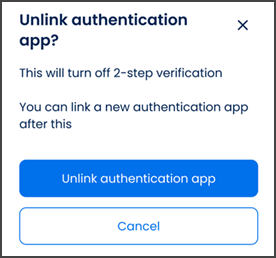
authentication.verification-disable authentication.verification-disabled
This screen includes:
| # | Element | Description |
|---|---|---|
| 1 | Confirmation modal | Confirms that the user wants to unlink the authentication app. |
| 2 | Modal title | Displays Unlink authentication app? |
| 3 | Close action | Closes the modal. |
| 4 | Warning message | Explains that unlinking turns off 2-step verification. |
| 5 | Re-enrollment message | Explains that a new authentication app can be linked later. |
| 6 | Unlink action | Unlinks the authentication app and disables MFA. |
| 7 | Cancel action | Closes the modal and keeps MFA enabled. |
| 8 | Background security screen | Shows the current MFA status behind the modal. |
Workflow
- Open the 2-step verification settings.
- Select Unlink Authentication app.
- Display the confirmation modal.
- Select Unlink authentication app to disable MFA.
- Select Cancel, close the modal, or use the close action to keep MFA enabled.
Validations
| Scenario | App behavior | SDK output |
|---|---|---|
| Session invalid | Block request | state = unauthenticated |
| MFA enabled | Display unlink confirmation modal | mfa = enabled |
| MFA already disabled | Do not submit unlink request | mfa = disabled |
| Unlink succeeds | Disable 2-step verification | mfa = disabled |
| Request rejected | Display error state | status = 405 |
Actions
| Scenario | App behavior | SDK output |
|---|---|---|
| Unlink selected | Load confirmation modal | PUT /api/v3/account/mfa/disable/confirm |
| Unlink authentication app selected | Disable MFA | POST /api/v3/account/mfa/disable |
| Cancel selected | Close modal and keep MFA enabled | state = cancelled |
| Close selected | Close modal and keep MFA enabled | state = dismissed |
| Request rejected | Preserve current state | state = unchanged |
Endpoint Resources
Verification Disabled
PUT
v3/authentication/PUT/api/v3/account/mfa/disable/confirm
Returns the confirmation modal before the user unlinks the authentication app.