NPS Rating
Use the Rating and NPS screen to collect patient feedback after a completed visit.
This screen collects one NPS score for the doctor or clinic and one NPS score for the Air Doctor service.
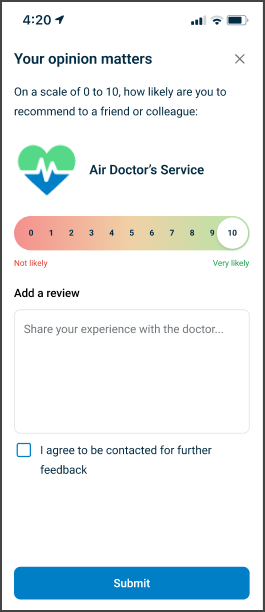
This screen includes:
- A Doctor Feedback step that collects a 0–10 NPS score for the patient experience with the doctor or clinic.
- A written review field for the doctor or clinic.
- A Service Feedback step that collects a 0–10 NPS score for the patient experience with the Air Doctor platform.
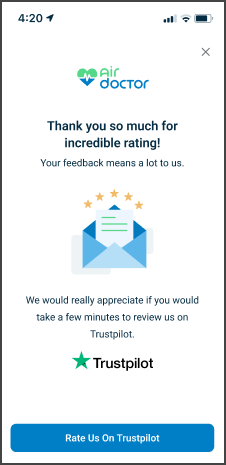
- A Trustpilot review prompt after submission.
Display on mobile only.
On desktop, the app shows the Home page and places the Air Doctor logo on the left.
Workflow
This sequence describes how you complete the Rating and NPS screen.
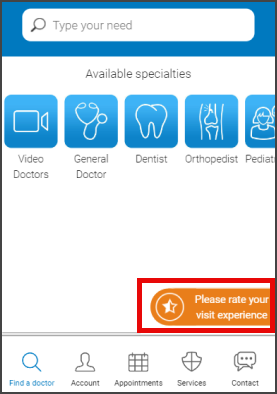
- Select Please rate your visit experience on the home screen.
- Review the Doctor Feedback step.
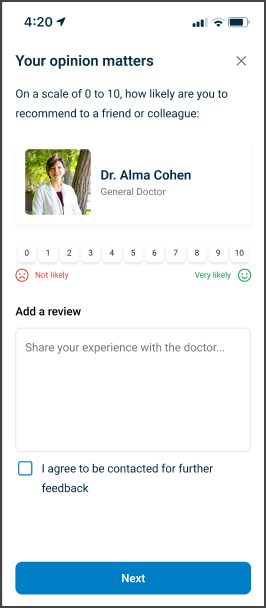
- Select a Doctor Experience NPS score.
- Optionally enter a written review.
- Select Next.
- Review the Service Feedback step.
- Select an Air Doctor Service NPS score > select Next.
- After the user submits feedback, show the gratitude pop-up.
Validations
This screen does not render on desktop.
Use a mobile device or mobile emulator when testing this flow.
These scenarios describe how the app validates access to the Rating and NPS screen.
| Scenario | App Behavior | SDK Output |
|---|---|---|
| No authenticated patient session exists. | The app blocks access and displays the default entry point. | Exposes an unauthenticated state. |
| The screen loads on desktop. | The app does not display the screen and shows the Home page layout. | Exposes a device or layout state. |
| No Doctor Experience NPS selection exists. | The app disables Next or displays a validation message. | Returns a required-field validation state. |
| No Air Doctor Service NPS selection exists. | The app blocks submission or displays a validation message. | Returns a required-field validation state. |
| The backend returns an invalid feedback schema. | The app displays an error or fallback screen. | Returns a schema validation error. |
Actions
These scenarios describe how the app uses the Rating and NPS screen.
| Scenario | App Behavior | Integration Notes |
|---|---|---|
| The patient opens the screen. | The app displays the feedback interface. | Use deep-link routing on mobile. |
| The patient completes Doctor Feedback. | The app stores the doctor NPS score and review. | Preserve input until submission. |
| The patient submits Service Feedback. | The app stores the service NPS score and completes the flow. | - |
| The patient completes the flow. | The app displays a Trustpilot review prompt. | Provide a single Trustpilot action. |
Endpoint Resources
Application Rating
PUT
/rating/application
This endpoint returns the application rating screen configuration for the specified appointment.
Feedback
PUT
/rating/feedback
This endpoint returns the feedback request screen configuration.
Gratitude
PUT
/rating/gratitude
This endpoint returns the gratitude screen configuration shown after feedback submission.
Doctor Rating
PUT
/rating/profile
This endpoint returns the doctor rating screen configuration for the specified appointment.
Open Trustpilot Page
PATCH
/rating/open-trustpilot
This endpoint closes the gratitude screen and opens the Trustpilot review page.
Proceed Application Rating
POST
/rating/application
This endpoint submits and saves the application rating for the specified appointment.
Proceed Doctor Rating
POST
/rating/profile
This endpoint submits and saves the doctor rating for the specified appointment.