Present Discount
Use Present Discount to add, update, or remove an appointment discount before submission of the Visit Took Place report.
The screen displays the appointment total and recalculates the amount after discount changes.
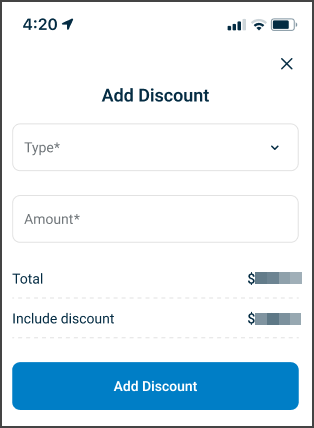
This screen includes:
| # | Element | Description |
|---|---|---|
| 1 | Discount type | Selects the discount type |
| 2 | Amount | Specifies the discount amount |
| 3 | Total | Displays the net fee plus additional charges |
| 4 | Include discount | Displays the total after the discount |
| 5 | Discount actions | Add, update, or remove the discount |
Workflow
Add a Discount
- Open the appointment Visit Summary.
- Select Add Discount.
- Select a discount type.
- Enter the discount amount.
- Review the updated totals.
- Select Add discount.
Update a Discount
- Open the existing discount.
- Change the discount type or amount.
- Review the updated totals.
- Select Update.
Remove a Discount
- Open the existing discount.
- Select Remove.
- Apply the returned update set to the appointment summary.
Validations
| Scenario | App behavior | SDK output |
|---|---|---|
| Discount type is missing | Block submission and identify the required field | Validation error |
| Amount is not numeric | Block submission and identify the amount field | Validation error |
| Amount falls outside the accepted range | Block submission | Validation error |
| Discount operation is not allowed | Block the action | Error response |
| Request succeeds | Update the discount and totals | PATCH update set |
| Request returns an application error | Preserve the current discount state | Error response |
Actions
| Scenario | App behavior | SDK output |
|---|---|---|
| Add discount selected | Add the discount and update totals | PATCH update set |
| Discount value changes | Refresh the affected discount fields | PATCH update set |
| Update selected | Update the discount and totals | PATCH update set |
| Remove selected | Remove the discount and update totals | PATCH update set |
Calculation
The screen displays these values:
| Value | Calculation |
|---|---|
| Total | Appointment net fee + additional charges |
| Include discount | Total − discount |
All amounts use the appointment currency.
Endpoint Resources
Present Discount
PUT
v3/appointments/{appointment-id}/summary/discount
Displays the Manage Discounts screen for the specified appointment.
Path Parameters
| Parameter | Type | Required | Description |
|---|---|---|---|
appointment-id | Integer | Yes | Identifies the appointment |
UI Element Types
| Level | Reference | Type | Value | Placement |
|---|---|---|---|---|
| 1 | discount-type | Combo | Type | 1 |
| 1 | discount-amount | Double | Amount | 1 |
| 1 | discount-total-title | Regular | Total | — |
| 1 | discount-total-spacer | Spacer | — | ~ |
| 1 | discount-total-amount | Regular | Net fee + additional charges | ~ |
| 1 | include-discount-title | Regular | Include discount | — |
| 1 | include-discount-spacer | Spacer | — | ~ |
| 1 | include-discount-amount | Regular | Total − discount | ~ |
| 1 | create | Button | Add discount | 1 |
| 1 | update | Button | Update | 1 |
Add Discount
PATCH
v3/appointments/{appointment-id}/summary/discount
Adds a discount to the appointment summary and returns an update set.
Update Discount
PATCH
v3/appointments/{appointment-id}/summary/discount/update
Updates the discount values for the appointment and returns an update set.
Patch Discount
PATCH
v3/appointments/{appointment-id}/summary/discount/patch
Returns an update set for discount fields on the active appointment summary.
Delete Discount
PATCH
v3/appointments/{appointment-id}/summary/discount/delete
Removes the discount from the appointment summary and returns an update set.