Pharmacy Details
The Pharmacy Details section stores pharmacy information for prescriptions that require a specific dispensing location. The section renders in the Documents step of the Visit Took Place (VTP) workflow.
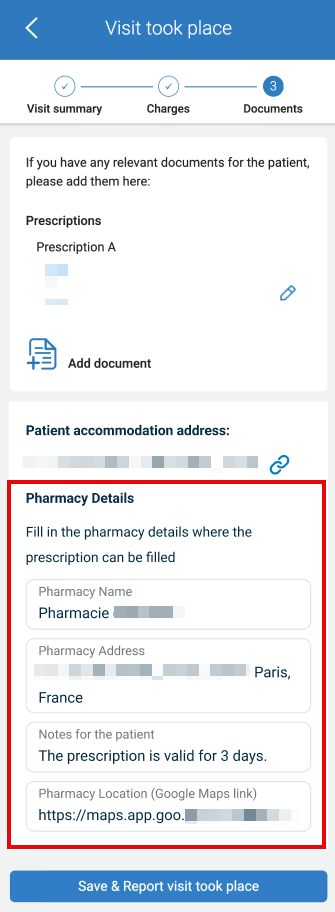
This section includes
- Helper text: Add details only if a specific pharmacy is required.
- Add Pharmacy details trigger.
- Patient accommodation address block with Google Maps link.
- Pharmacy input form:
- Pharmacy Name.
- Pharmacy Address.
- Notes for the patient.
- Pharmacy Location (Google Maps link).
- Submit control: Save & Report visit took place.
Workflow
- Open the Visit Took Place flow.
- Navigate to the Documents step.
- Select +Add Pharmacy details.
- The app renders the Pharmacy Details form.
- Enter the pharmacy values as required.
- Select Save & Report visit took place.
Validations
| Condition | Constraint | Result |
|---|---|---|
| Pharmacy not required | No input requested | Section remains collapsed |
| User selects trigger | Expand form | Input fields render |
| Maps link provided | URL accepted | Navigation enabled |
Actions
| Input | State | Output |
|---|---|---|
| Select Add Pharmacy details | Documents step active | Render pharmacy form |
| Set pharmacy fields | Form active | Update VTP payload |
| Select accommodation link icon | Address available | Open Google Maps |
| Submit VTP report | Any form state | Persist pharmacy details |