Remove Interpreter
Use the Remove Interpreter dialog to disconnect an interpreter from an active video consultation.
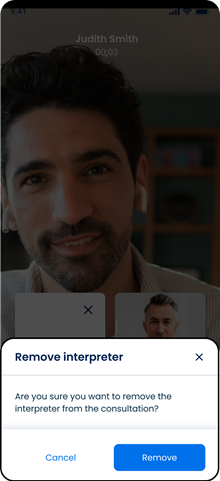
This screen includes:
| # | Element | Description |
|---|---|---|
| 1 | Confirmation message | Requests confirmation to remove the interpreter |
| 2 | Yes action | Disconnects the interpreter |
| 3 | No action | Keeps the interpreter connected |
| 4 | Close action | Dismisses the dialog |
Workflow
- Open an active video consultation with an interpreter.
- Select the interpreter removal action.
- Call
PUT /api/v3/appointments/{appointment-id}/video-room/interpreter/hangup. - Display the confirmation dialog.
- Select Yes to remove the interpreter.
- Call
POST /api/v3/appointments/{appointment-id}/video-room/interpreter/hangup. - Update the video consultation without the interpreter.
Validations
| Scenario | App behavior | SDK output |
|---|---|---|
| No interpreter is active | Hide the removal action | state = unavailable |
| Interpreter is active | Enable the removal action | state = available |
| Removal is not confirmed | Keep the interpreter connected | state = unchanged |
| Session is invalid | Reject the request | state = unauthenticated |
| Request fails | Keep the current session state | state = error |
Automatic Disconnect
| Condition | App behavior |
|---|---|
| Video consultation ends | Disconnect the interpreter |
| Interpreter reaches the inactivity limit | Disconnect the interpreter |
Actions
| Scenario | App behavior | SDK output |
|---|---|---|
| Removal action selected | Display the confirmation dialog | Page object |
| Yes selected | Disconnect the interpreter | state = removed |
| No selected | Dismiss the dialog | state = unchanged |
| Close selected | Dismiss the dialog | Close event |
Endpoint Resources
Hangup Interpreter
PUT
v3/appointments/{appointment-id}/video-room/interpreter/hang-up
Displays the interpreter removal confirmation dialog for the specified video consultation.
note
This endpoint displays the confirmation dialog. The interpreter remains connected until the user confirms removal.
Remove Interpreter
POST
3/appointments/{appointment-id}/video-room/interpreter
Disconnects the interpreter from the active video consultation.