Walk-In
Use Walk-In to generate a QR code for a patient who requires a walk-in appointment.
The doctor selects the applicable walk-in options. The screen then provides a QR code for the patient to scan and continue the appointment flow in the Air Doctor app.
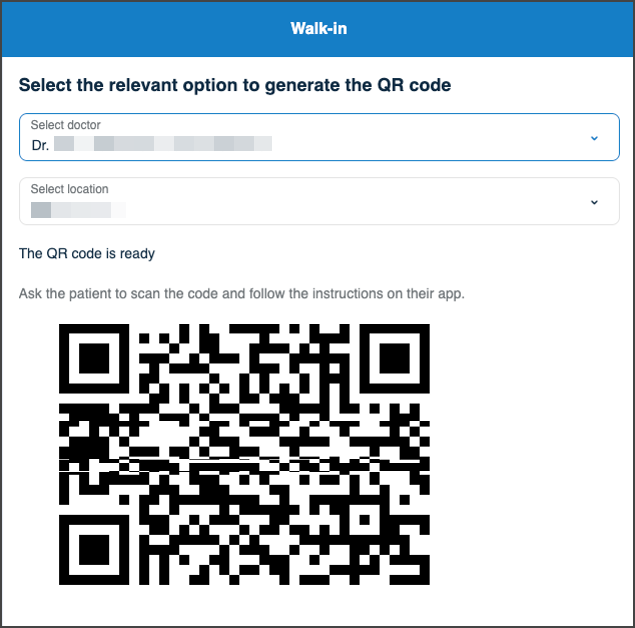
This screen includes:
| # | Element | Description |
|---|---|---|
| 1 | Screen header | Displays Walk-in with back and support actions |
| 2 | Location selector | Selects the clinic or location for the walk-in visit |
| 3 | QR code status | Confirms that the QR code is ready |
| 4 | Patient instructions | Instructs the patient to scan the code and follow the steps in the app |
| 5 | QR code | Provides the code the patient scans to start the walk-in flow |
Workflow
important
Select coverage before the visit location.
- Call
PUT /api/v3/walk-in. - Render the returned walk-in page.
- On profile change, call
PATCH /api/v3/walk-in/change-profile. - On location change, call
PATCH /api/v3/walk-in/change-location. - On specialty change, call
PATCH /api/v3/walk-in/change-specialty. - Apply each PATCH update set to the active screen.
- Display the QR code from the updated page state.
Validations
| Scenario | App behavior | SDK output |
|---|---|---|
| Required walk-in selection is missing | Prevent QR code use until the required selection exists | Validation state |
| Location changes | Update the walk-in screen for the selected location | PATCH update set |
| Doctor profile changes | Update the walk-in screen for the selected profile | PATCH update set |
| Specialty changes | Update the walk-in screen for the selected specialty | PATCH update set |
| Walk-in screen request succeeds | Display the applicable walk-in controls and QR code | Page object |
| Walk-in update request succeeds | Apply the returned changes to the active screen | PATCH update set |
| Request returns an application error | Display the applicable error state | Error response |
Actions
| Scenario | App behavior | SDK output |
|---|---|---|
| Walk-in flow opens | Display the walk-in screen | PUT /api/v3/walk-in |
| Doctor profile selected | Update the walk-in selection | PATCH /api/v3/walk-in/change-profile |
| Location selected | Update the walk-in selection | PATCH /api/v3/walk-in/change-location |
| Specialty selected | Update the walk-in selection | PATCH /api/v3/walk-in/change-specialty |
| QR code is ready | Display the code and patient instructions | Updated page state |
| Patient scans QR code | Continue the patient walk-in flow in the Air Doctor app | QR code action |
| Back selected | Return to the previous doctor screen | Navigation event |
| Support selected | Open the available support option | Navigation event |
Endpoint Resources
Walk In
PUT
v3/walk-in
Displays the walk-in screen for the selected insurer.
Change Doctor
PATCH
v3/walk-in/change-profile
Updates the walk-in screen when the user selects a different doctor.
Change Location
PATCH
v3/walk-in/change-location
Updates the walk-in screen when the user selects a different location.
Change Specialty
PATCH
v3/walk-in/change-specialty
Updates the walk-in screen when the user selects a different specialty.