Select Coverage
Use Select Coverage to select the patient’s coverage before the doctor continues the walk-in flow.
The screen displays the coverage options available for the walk-in visit.
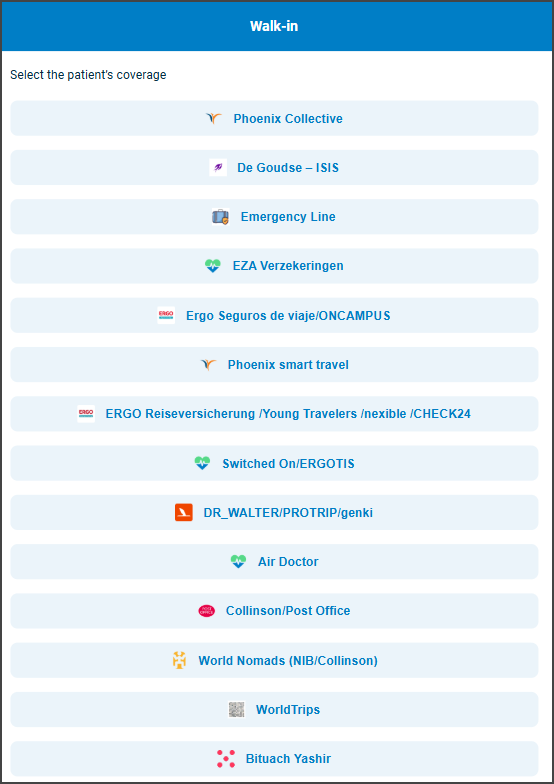
This screen includes:
| # | Element | Description |
|---|---|---|
| 1 | Screen header | Displays Walk-in with back and support actions |
| 2 | Coverage instruction | Prompts the doctor to select the patient’s coverage |
| 3 | Coverage options | Display the available insurer or coverage providers |
| 4 | Coverage action | Selects the applicable coverage and continues the walk-in flow |
Workflow
important
Select coverage before the visit location.
- Call
PUT /api/v3/walk-in/coverage. - Render the returned coverage options.
- Select the patient’s coverage.
- Continue to the next walk-in step.
Validations
| Scenario | App behavior | SDK output |
|---|---|---|
| Coverage options are available | Display the available coverage options | Page object |
| Coverage is selected | Continue the walk-in flow with the selected coverage | Page update |
| Request returns an application error | Display the applicable error state | Error response |
Actions
| Scenario | App behavior | SDK output |
|---|---|---|
| Coverage selected | Apply the selected coverage and continue | Page update |
| Back selected | Return to the previous screen | Navigation event |
| Support selected | Open the available support option | Navigation event |
Endpoint Resources
Select Coverage
PUT
v3/walk-in/coverage
Displays the insurer selection step in the walk-in flow.