Supported Integration Levels
This page defines the integration levels that partners use to connect with the Air Doctor platform. Each level increases capability and control. Level selection depends on the partner’s technical capacity and user-experience requirements.
Integration Levels
The six integration levels range from a simple forward or redirect level to a complete custom client that uses the OpenAPI.
| Level | Effort | Integration Method | End-User Experience |
|---|---|---|---|
| 1: Forward / Redirect | ≈ Hours | Forward to Air Doctor via deep link. | Users leave partner app; Air Doctor handles flow. |
| 2: Embedded WebView | ≈ Days | Embed Air Doctor web app in WebView. | Air Doctor UI in host app; partner may manage sessions. |
| 3: WebView with CSS overrides | ≈ 1–2 weeks | WebView with custom CSS styling. | Cohesive look; functions unchanged; delegation possible. |
| 4: Combined Front end | ≈ 1–2 months | Import Air Doctor shared into host app. | Unified application; partner controls navigation; Air Doctor provides screens. |
| 5: Custom UI on Client SDK | ≈ 6 person-months | Build custom UI on Air Doctor SDK. | Full UI control using Air Doctor logic. |
| 6: Direct API Integration | ≈ 2 person-years | Build complete client using OpenAPI. | Complete flexibility; partner implements entire client app. |
Level 1 – Forward / Redirect
Purpose - Offer the fastest path to integration.
What you provide
- Entry point in the host app (link or button).
- Policy and person identifiers inside the deep link.
- Basic explanation of the handoff to Air Doctor for end users.
What Air Doctor provides
- Authentication and user account management.
- All flows, screens, and business logic.
- Session handling and security controls.
- Maintenance of UX, accessibility, and release cadence.
From Level 2, user management can run in the Air Doctor app, in the partner app, or as a mix of both.
Level 1 always relies on Air Doctor for user management.
Common Scenarios
- Partner app links insured users to Air Doctor through a deep link.
- Partner provides an entry point for medical search or appointment creation.
- Travel assistance provider needs immediate activation without UI alignment.
- Call center workflow requires quick escalation into the Air Doctor flow.
- Partner system requires zero maintenance of medical logic or screen flows.
This section describes the Forward / Redirect integration model.
Level 2 – Embedded WebView
Purpose - Keep users inside the host app with minimal effort.
The partner app embeds the Air Doctor web client inside a WebView.
Air Doctor UI and flows run inside this view. The partner can delegate user authentication and session control to its own system when required.
What you provide
- WebView container in the host app.
- Optional single sign-on and session control.
- Navigation entry points that open the embedded Air Doctor view.
What Air Doctor provides
- Web client for appointments and related flows.
- Layout, visual design, and interaction logic inside the WebView.
- Secure handling of session data inside Air Doctor services.
Common Scenarios
- Partner app keeps users inside the host app while Air Doctor controls the experience.
- Insurance provider uses internal authentication and supplies sessions to the WebView.
- Partner needs a simple embedded experience without design modification.
- Healthcare provider wants a contained view of Air Doctor inside an existing workflow.
- Concierge service requires access to doctor search and booking inside a controlled container.
This section describes the Embedded WebView integration model.
Level 3 – WebView with CSS overrides
Purpose - Align the embedded experience with partner branding.
The partner supplies a CSS file that customizes the look and feel of the embedded Air Doctor app.
Only style elements change; features and layouts stay the same, and the partner can still delegate user management.
What you provide
- WebView container and navigation entry points.
- Custom CSS that applies brand colors, typography, and components.
- Ongoing updates to the CSS as themes evolve.
What Air Doctor provides
- Stable DOM structure and class hooks for CSS.
- Web client behavior and layout that respect accessibility rules.
- Authentication and user management, or support for delegated flows.
Common Scenarios
- Partner applies brand colors, typography, and layout refinements to align with its design system.
- Marketing team requires consistent branding across all flows inside the partner app.
- Partner app supports multiple themes and needs CSS variations across regions.
- Insurance provider demands uniform UI identity while Air Doctor maintains logic.
- Enterprise vendor aligns embedded components with strict accessibility rules.
This section describes the WebView with CSS overrides integration model.
Level 4 – Combined Front end
Purpose - Create a unified app that uses Air Doctor screens as shared.
The client front end is open source and serves as a reference implementation. Partners import the required shared (pure JavaScript for web, Kotlin for Android, Swift for iOS) and integrate them into their app. The partner supplies the application shell such as navigation and menus, and Air Doctor supplies individual screens such as appointment booking and medical history. This approach keeps users inside the host app and allows screen reordering or combination of screens. User management either integrates with the partner system or uses Air Doctor services.
What you provide
- Application shell and navigation structure.
- Integration of JavaScript, Kotlin, or Swift shared into the host code base.
- Choice and order of Air Doctor screens inside user flows.
- Connection to your authentication stack and user profiles.
What Air Doctor provides
- Open-source front-end shared for core screens.
- Consistent behavior and interaction logic for those screens.
- Updates to shared when server behavior changes.
- Documentation for supported entry points and props.
Common Scenarios
- Partner integrates Air Doctor screens inside its own navigation structure.
- Partner requires screen reordering or conditional access to screens.
- Healthcare partner embeds booking screens inside a larger care-management flow.
- Insurance provider wants direct control of routing and entry points.
- Desktop and mobile teams adopt Air Doctor shared for consistent behavior across platforms.
This section describes the Combined Front end integration model.
Level 5 – Custom UI on Client SDK
Purpose - Use Air Doctor logic while you control every pixel.
Partners design a custom user interface and rely on Air Doctor business logic through the Client SDK.
The SDK, written in Kotlin, compiles into JavaScript, JVM bytecode, and native iOS binaries.
Partners implement screens with frameworks such as plain JavaScript, Jetpack Compose, or SwiftUI based on instructions from the back end.
Air Doctor works with partners to ensure accessibility and alignment with Air Doctor values.
What you provide
- Complete UI design and layout.
- Implementation of screens in your chosen frameworks.
- Integration of the Client SDK into build and release pipelines.
- Monitoring of API and SDK changes and prompt adaptation of your UI.
What Air Doctor provides
- Client SDK with domain logic and state control.
- Documentation of flows, data contracts, and best practices.
- Support for accessibility and UX review.
- Coordination on releases that affect SDK behavior.
Common Scenarios
- Partner needs full UI ownership with Air Doctor logic inside the state layer.
- Engineering team uses native components such as Compose or SwiftUI for full brand control.
- Partner runs a design system that requires strict alignment across screens.
- Insurance provider integrates appointment logic inside an existing care journey.
- Enterprise partner requires deep accessibility controls and screen-level adjustments.
Level 6 – Direct API Integration
Purpose - Gain full control of UI and domain logic with maximum flexibility.
Partners bypass the Air Doctor client and create their own client that uses the OpenAPI.
They design the interface and domain logic and send HTTP requests for registration, doctor lookup, appointment management, and related actions.
This level requires deep domain knowledge and careful attention to authentication and hypermedia responses.
Because the server follows the HATEOAS principle, clients parse hypermedia links to discover available actions.
What you provide
- Complete client architecture and UX design.
- Implementation of all screens and flows.
- HTTP client layer that consumes the OpenAPI.
- Management of authentication, authorization, and security policies.
- Monitoring of API lifecycle, version changes, and deprecation notices.
What Air Doctor provides
- OpenAPI specification with endpoints, schemas, and error models.
- Hypermedia-driven responses that expose available actions.
- Documentation that aligns endpoints with screen-level concepts.
- Technical and product guidance during design and rollout.
Common Scenarios
- Partner builds a complete medical assistance client from the ground up.
- Insurance provider requires total control of domain logic, navigation, and presentation.
- Large platform aggregates multiple health services and integrates Air Doctor as one of many flows.
- Partner integrates OpenAPI actions inside an orchestration engine.
- AI-driven system analyzes hypermedia responses and selects next steps without UI dependencies.
This section describes the Direct API integration model.
How to Choose the Right Level of Integration
When you select an integration level, consider these factors.
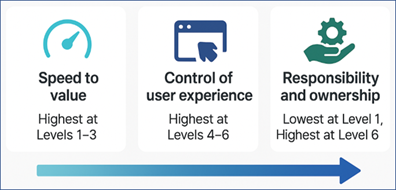
- Time to market - Levels 1–3 suit fast enablement. Higher levels require more effort but provide tighter integration and a smoother user journey.
- User experience requirements - Higher levels provide increased control over look, feel, and navigation.
- Maintenance and upgrade burden - Levels 1–3 place most maintenance on Air Doctor. Levels 4 and higher require continuous review of API changes and updates to SDKs.
- Security and compliance - Higher levels place greater responsibility for personal data handling on the partner. Lower levels delegate part of this responsibility to Air Doctor.