Level 4 - Combined Frontend SDK
- Uses the open-source front-end and the client back-end SDK.
- Allows selective component overrides.
- Retains full Air Doctor workflow, security, and logic.
- Enables deep customization without a full UI rebuild.
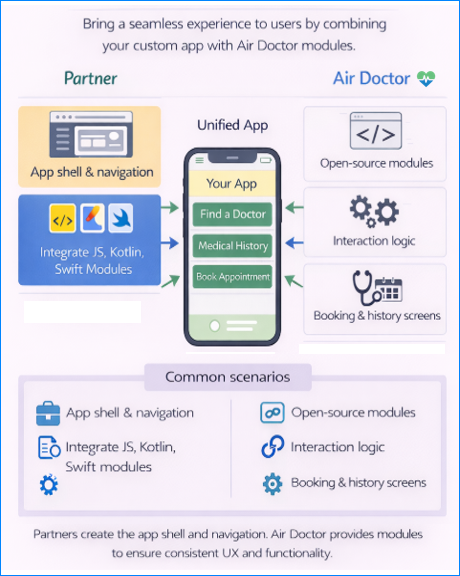
Where Level 4 Fits
| Level | Description |
|---|---|
| 3 | CSS overrides and appearance control |
| 4 | Component-level customization by using the open-source front-end |
| 5 | Full custom front-end that consumes the client back-end |
What Level 4 Provides
The Combined Front-end option sits between the lightweight embed levels (1–3) and the fully bespoke implementations of Levels 5 and 6.
At Level 4 you no longer treat the entire Air Doctor web application as a black box, and you not build your own interface from scratch. Instead, you integrate our client back‑end SDK directly into your project and compose the user interface with the open‑source front‑end, with select component overrides that match your application’s look, feel, and flow.
This level provides a balance between speed to market and deep customization. You inherit all Air Doctor functionality and logic out of the box and still tailor individual features and behaviors to your host app.
Supplied Components
Level 4 includes two elements that operate together: the client back-end libraries and the reference front-end source.
The back-end provides logic, workflows, and communication with the Air Doctor server.
The front-end provides platform-native UI that consumes those interfaces.
Client Back-End
Pre-compiled integration shared for each platform:
- Swift framework (iOS)
- Kotlin JAR (Android)
- Minified ES module (web)
Exposes interfaces for navigation, data access, authentication, and state management.
Controls all communication with the Air Doctor server and enforces security and workflow rules.
Reference Front-End
Open-source UI implementations that consume the back-end interfaces:
- JavaScript (web)
- Kotlin (Android)
- Swift (iOS)
Uses simple, native components to maintain compatibility across platforms and support selective UI overrides in Level 4.
How to Customize
Your host application imports the back-end library and then extends or replaces parts of the reference front-end. The front-end interacts with the back-end by using a defined interface. Each method in that interface accepts overrides.
Common customization cases include:
UI Field Components
- Replace input widgets such as phone number or date fields with components from your preferred UI library.
- Any custom widget that implements the required protocol the back-end continues to function as expected.
Navigation and animation
- Override the navigation methods to match your host application’s page transitions and stack behavior.
- Apply custom slide-in transitions or integrate with the host back button. For example, you can implement custom slide‑in animations or integrate with your app’s back button to create a consistent experience.
Error handling
- Intercept error states from the back‑end and present a branded alternative that aligns with your application's design.
- Maintain Air Doctor workflow rules during error presentation.
External links
- Override the default link‑handling method to launch your own in‑app browser or intercept specific hosts (for example, privacy policies) to display them in your own WebView.
Loading and splash screens
- Replace the default loading indicators with your own branded spinner or progress bar.
- Display a custom "splash” screen while initial data loads.
Interfaces remain nearly identical across platforms, so understanding one platform’s interfaces simplifies integration on the others. We recommend that you isolate overrides in separate shared and maintain documentation that explains the purpose of each change to simplify and support future upgrades.
Integration Model
At Level 4 you compile and link the Air Doctor libraries directly into the host application.
Components instantiate programmatically.
- Web: Import the ES module and render widgets inside the host HTML.
- Android: Add the JAR dependency through Gradle.
- iOS: Include the framework through Swift Package Manager or CocoaPods.
As the SDK manages routing, authentication, and session state across all levels, .
The host environment coordinates screens freely but must always respect the business rules enforced by the back-end.
Keeping up to Date
The Air Doctor SDK and reference front‑ends evolve over time. We aim to maintain backward compatibility, but support duration can vary by feature. As new fields, flows, or security requirements appear, your customized implementation must pull updates from our Git repository and adapt any overrides accordingly. We recommend subscribing to our release notes and allocating engineering resources for periodic maintenance.
Maintenance Checklist
- Pull updated code from the Git repository.
- Review new workflows and fields.
- Validate custom overrides against updated interfaces.
- Update custom shared if requirements change.
- Track release notes for each platform.
Summary
Level 4 is ideal if you want to use Air Doctor’s production‑ready interface and adjust specific aspects without re‑implementing the entire experience. If your design requires a fully bespoke look and feel, or the project creates all screens while relying on the Air Doctor back‑end, Level 5 (Custom Front‑end) is the preferred choice.
Level 5 implementors receive guidance on the minimal set of interfaces that require implementation. Level 4 implementors select functions to override and rely on Air Doctor's default implementations for all other behavior.