Level 1 - Forward Redirect
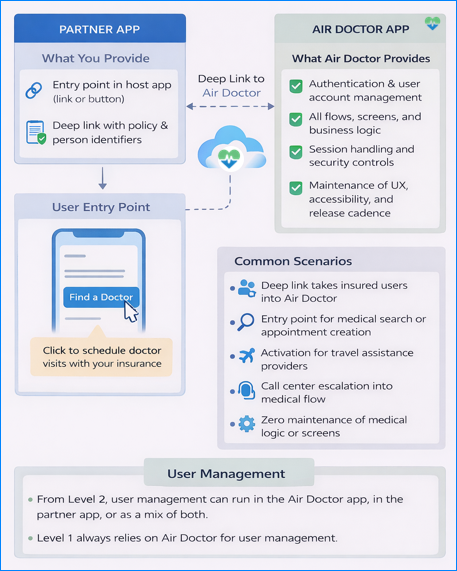
- Direct link access to the Air Doctor application.
- No user interface development on the partner side.
- Air Doctor controls authentication, identity, and all screens.
- A single
dataparameter enables automatic field population and routing. - Fast activation for insurers and assistance companies with limited resources.
Who This Level Fits
- Partners with minimal resources — You need access to Air Doctor services without building a user interface.
- Teams with limited capacity — You need to offer Air Doctor services but cannot devote resources to build a custom application.
- Projects that need activation — You need a functional integration within hours or days, rather than weeks.
Handling User Management
With forward/redirect integration, Air Doctor takes full responsibility for user registration, login, and identity management. The partner does not create user accounts or process sensitive data. For convenience, partners can prefill specific Air Doctor form fields through a deep link. End users can edit all prefilled values.
Customized Welcome and Automatic Navigation
When a link includes a data parameter with at least a company identifier, Air Doctor tailors the experience for that company.
The standard welcome message changes to a company-specific greeting. The application bypasses the standard home screen and moves the user directly to the login/register page and then to the policy addition screen. After the user completes these steps, the application displays the usual start page. This sequence captures policy details early in the session.
Air Doctor Responsibilities
Air Doctor controls login/registration, and all identity steps inside the application.
The partner does not create accounts or process sensitive data.
Partner Responsibilities
The partner provides a link that contains optional default values.
Air Doctor reads the values and applies them in the relevant fields.
Optional Prefill Support
The link can include a data parameter with patient and policy information.
End users can adjust all prefilled values before submission.
User Flow Overview
- User selects the partner link.
- Air Doctor identifies the partner through the company identifier.
- Application displays the login.
- App directs the user to the "Add coverage" page.
This sequence captures policy details at the start of the session.
Building the Redirect Link
The partner constructs a URL (redirect link) that points to the Air Doctor application. The URL includes a single query parameter, data. The data parameter contains contains a URL-safe Base64-encoded JSON object. The JSON defines default default values for patient and policy field. All properties are optional except for the company identifier (c).
Data Format
The data parameter is the JSON object encoded with Base64. To ensure URL safety, replace the + character with - and / with _ after encoding.
All values use strings, including numbers such as the last four digits of a card.
Example structure (before encoding):
{
  "c": "12345",                  // Company ID (required)
  "i": "user-abc",               // Air Doctor database user ID
  "p": "POL1234567",             // Policy number
  "f": "Jane",                   // First name
  "l": "Doe",                    // Last name
  "g": "female",                 // Gender: male, female, other
  "n": "ID123456789",            // Government personal ID number
  "b": "1990-04-15",             // Date of birth (YYYY-MM-DD)
  "s": "2025-01-01",             // Policy start date (YYYY-MM-DD)
  "e": "2026-01-01",             // Policy end date (YYYY-MM-DD)
  "t": "+380441234567",          // Phone number
  "m": "jane.doe@example.com",   // Email address
  "d": "1234",                   // Payment card last four digits
  "ts": "2025-05-01",            // Travel start date (YYYY-MM-DD)
  "te": "2025-05-15",            // Travel end date (YYYY-MM-DD)
  "pa": "Premium",               // Purchased insurance package
  "pi": "SPID987654"             // Policy identifier
}
Prefill Fields
When the user opens the link, Air Doctor decodes JSON object and applies the values as default entries in the relevant fields, including patient name, policy number, and contact details. End users can update these values before submission. If your organization pushes policy data into Air Doctor through a separate server integration, Air Doctor returns links with agreed fields already prefilled.
Generating the Links
A redirect link follows this structure:
https://www.air-dr.com/?data={'{'}base64{'}'}
The {base64} placeholder represents the URL-safe Base64 encoding of the JSON object described above.
// Construct the JSON object
const payload = {
  c: "12345",
  f: "Jane",
  l: "Doe",
  g: "female"
  // Add other fields
};

// Convert to string and encode as URL-safe Base64
const jsonString = JSON.stringify(payload);
const base64 = btoa(jsonString)
  .replace(/\+/g, "-")
  .replace(/\//g, "_");

const link = `https://www.air-dr.com/app/?data=${base64}`;
console.log(link);
This example uses the browser’s btoa function to perform Base64 encoding and applies the required replacements for URL safety.
Next steps
Forward or redirect integration enables partners to provide Air Doctor access without building a custom interface. For deeper integration levels that embed the Air Doctor UI or provide a tailored user experience, see Embedded Webview, Combined Front-End, and additional integration levels.