Direct API Integration
- The host controls the full UI.
- Air Doctor provides a structured REST API.
- All screens load through PUT endpoints.
- All updates apply through PATCH.
- All actions commit through POST`.
- All files download through GET.
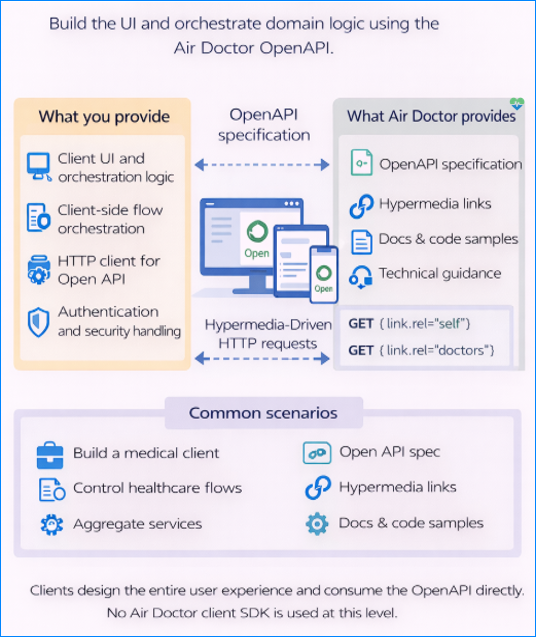
At Level 6 the host application takes full ownership of the user experience by consuming the Air Doctor REST API directly. Instead of an embedded UI or SDK reuse, the host application calls the same endpoints that Air Doctor clients use, and the host technology stack renders the interface, coordinates flows, and applies its own design system.
This model offers maximum flexibility and suits teams that want to integrate Air Doctor medical assistance workflows inside a custom product with its own UI, logic, and branding.
API Discovery
The API includes complete documentation through the OpenAPI specification available at /openapi.html on each environment:
dev.air-dr.comtest.air-dr.comstaging.air-dr.comprod.air-dr.com
The specification lists content by screens and functional areas. Each operation lists the accepted parameters and a standard response format that applies across all calls.
HTTP Methods and Semantics
Air Doctor’s REST API uses a server‑driven UI model. The semantics of each of the HTTP methods align with the HATEOAS structure of the system.
Key methods
| Method | Task | Description |
|---|---|---|
| PUT | Load a screen from the server | You request a specific screen (for example, appointments-list) and the server returns a JSON object with the screen definition, layout instructions, and a list of actions (such as buttons, links, etc.) that the user can perform. |
| PATCH | Request incremental updates | After the initial screen loads,PATCHrequests return only the changes required to update the current view. These are triggered by user events (for example, selection of a specialty) or by server‑side changes (as in, appointment availability). |
| POST | Commit an action | UsePOSTto save user input or trigger operations (such as, book an appointment or upload a document).POSTcalls return no body; the response includes headers and the HTTP status. In most cases the server returns HTTP 204 (No Content), with a Location or Next-Screen header that indicates the next navigate target. |
| GET | Retrieve a binary resource | Files such as images, PDFs, fonts, or other assets download through GET and return in their native format. The caller is responsible for caching and storage. |
Input Parameter Handling
All endpoints accept parameters through:
- Query strings
- Form fields
- Multipart/form-data
Parameter location is interchangeable because the routing layer collects inputs before processing.
Parameter names follow a structural naming scheme rather than a globally unique model. For example, fields that belong to one logical object use a common prefix.
This model passes structured data without JSON request bodies or DTOs and relies on a simple HTTP encoding format.
Authentication and Tokens
Most API operations require a user access token.
The OpenAPI specification identifies whether an endpoint accepts a:
- Patient token
- Doctor token
- Any token
- No token
Even when a token is optional,the use of a token is recommended because a token enables personalization and authorization.
Any token-injection mechanism applies.
Whichever mechanism you choose, ensure that the token stays confidential and stays current according to its expiry time.
Real-Time Updates
To keep clients current without constant polling, Air Doctor provides two mechanisms for real-time synchronization: server-sent events (SSE) and partner-controlled push notifications.
Server-Sent Events (SSE)
Air Doctor exposes one user-level SSE stream per token.
A subscription delivers:
- Screen updates
- Messages
- Appointment changes
- Other state updates
Air Doctor exposes one stream per user token, not one per resource.
Push Notifications (Mobile)
For native mobile integrations, Air Doctor uses push notifications. When an event occurs, the Air Doctor backend calls the partner’s backend (server) with a request to forward a push notification.
The partner backend is responsible tp delivery the PUSH to their app, which in turn should update the relevant screens. This indirection ensures that partners retain control over their notification channels while the Air Doctor experience stays in sync.
If the partner backend drops or delays notifications, the mobile app may not reflect the latest state. Reliable callback processing from Air Doctor is required.
Next Steps and Sub‑Articles
Level 6 requires a deeper understanding of our API model than the previous integration levels. The following sections provide detail guidance for implementing a custom client:
| Topic | Description |
|---|---|
| Access Token Handling | Describes different token injection strategies, the distinction between patient and doctor tokens, and key security considerations. |
| Input Parameters | Outlines the parameter naming scheme, locations (query, form, multipart), and encoding rules. Learn how to construct requests without using JSON bodies. |
| PUT- Screen loading | Describes how to call screen endpoints, interpret the returned layout and actions, and initialize your interface. |
| PATCH- Screen updates | Explains the incremental update mechanism, event triggers, and the process for merging updates into your UI. |
| POST - Commit actions | Details how to submit user actions, handle server responses, and direct the user to the next screen. |
| GET - File retrieval | Covers downloading and caching for binary assets such as images, documents, and fonts. |
| Error Handling | Covers the error messages the server can return. |
| Real-Time Updates | Describes server‑sent events and push notifications, including registration flows and best practices for maintaining state across devices. |