Status Cannot Be Changed
Use Status Cannot Be Changed to inform the doctor that availability updates are temporarily blocked.
The app displays this screen when the backend enforces restrictions that prevent status changes.
The screen provides guidance and an option to contact support.
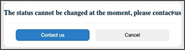
This screen includes:
- A static message that explains the restriction.
- A Contact Us button that opens a support request flow.
- A Cancel button that closes the modal.
- A close control (×) that dismisses the dialog.
- No editable fields or user input.
- Conditional visibility based on backend restriction flags.
important
This restriction is enforced by the backend.
The doctor cannot change availability status until the restriction is removed by Customer Care.
Workflow
- The doctor attempts to update availability status.
- The backend rejects the request due to an enforced restriction.
- The app displays the Status Cannot Be Changed modal.
- The doctor can:
- Select Contact Us to request assistance.
- Select Cancel or × to close the modal.
Validations
| Scenario | App Behavior | SDK Output | Example |
|---|---|---|---|
| Status change is allowed. | The modal does not appear. | Normal update response. | — |
| Status change is restricted. | The modal appears immediately. | Restriction response. | — |
| User selects Contact Us. | The app opens a support flow. | Support navigation state. | — |
| User closes the modal. | The app returns to the previous screen. | Navigation update. | — |
Actions
| Action | App Behavior | SDK Output |
|---|---|---|
| Open restriction modal. | The app blocks the status update. | Restriction state. |
| Select Contact Us. | The app initiates a support request. | Support flow state. |
| Select Cancel or ×. | The app closes the modal. | Navigation update. |
Endpoint Resources
Status Cannot be Changed
PUT
/availability-status/cannot-be-changed
Shows a popup when the availability status cannot be changed due to business rules.
UI Element Types
| Level | Reference | Type | Value | Placement |
|---|---|---|---|---|
| 1 | spacer | Spacer | — | ~ |
| 1 | close | Link | [x] | ~ |
| 1 | cannot-be-changed | Regular | The status cannot be changed at the moment, please contact us | ~ |
| 1 | contact-us | Button | Contact Us | ^ |
| 1 | cancel | Secondary | Cancel | ~ |